Walk into any electronics store or speak to a software salesperson and you'll hear 'POS' and 'billing software' used as if they mean the same thing. They don't — and confusing the two is how businesses end up either overpaying for hardware-heavy systems they don't need, or using tools that can't handle their actual requirements.
This guide explains the real difference, what each does best, and helps you decide which one — or which combination — your business actually needs in 2025.
✅ Key Takeaways
- POS = Point of Sale — designed for physical checkout counters
- Billing software = creates invoices, tracks payments, manages GST
- POS requires hardware; billing software runs on any device
- Billing software handles B2B, services, and wholesale — POS does not
- Modern billing tools include counter-billing features of POS
- Khata Billing gives you GST billing + counter billing — no hardware needed
What is POS Software?
POS (Point of Sale) software is specifically designed for the moment of transaction at a physical checkout counter. It was built in an era when retail billing happened at a fixed counter with dedicated hardware.
A traditional POS system typically includes:
- Barcode scanner integration for fast product lookup
- Receipt printer support (thermal printer)
- Cash drawer management and shift-wise cash tallying
- Card/UPI payment terminal integration
- Quick checkout flow optimized for speed
POS software is hardware-dependent — it's designed to work with physical scanners, printers, and payment terminals. This makes it powerful for high-volume retail counters but expensive and inflexible for other business types.
What is Billing Software?
Billing software is a broader category. It handles the creation, management, and tracking of invoices and bills across all business types — not just physical retail counters.
Modern billing software like Khata Billing covers:
- GST-compliant invoice generation (CGST/SGST/IGST)
- Inventory management with auto stock updates
- Customer ledger and payment tracking
- Supplier management and purchase bills
- GSTR reports for CA and return filing
- Business reports: sales, collections, stock valuation
Billing software works on any device — phone, tablet, laptop — without any special hardware. It handles not just retail but also service businesses, wholesalers, manufacturers, and freelancers.
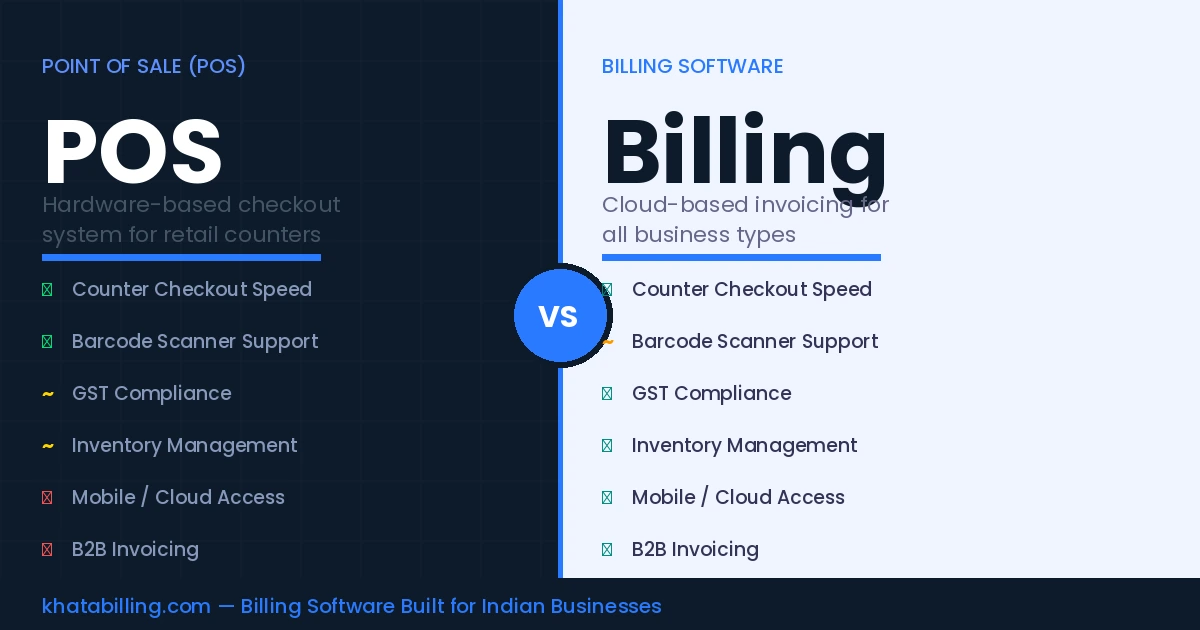
Key Differences: POS vs Billing Software
Here's a direct comparison across the factors that matter most:
- Hardware requirement: POS → dedicated scanner, printer, cash drawer required. Billing Software → any smartphone or laptop you already own.
- Business types supported: POS → primarily retail. Billing Software → retail, wholesale, services, manufacturing, freelance.
- GST compliance: POS → basic GST calculation. Billing Software → full GST invoicing, HSN codes, GSTR reports, e-invoicing.
- Cost: POS → ₹15,000–₹50,000+ setup including hardware. Billing Software → starts free (Khata Billing), no hardware cost.
- Mobility: POS → fixed counter only. Billing Software → bill from anywhere — counter, field, home, travel.
- B2B invoicing: POS → not designed for it. Billing Software → full B2B invoice support with buyer GSTIN, credit terms, and ledger.
When Do You Actually Need a POS System?
A dedicated POS system makes sense when:
- You run a very high-volume retail counter with 100+ transactions per day and need barcode scanning to be fast
- You operate a restaurant with table management, KOT (kitchen order tickets), and multiple billing stations
- You have a chain of stores and need centralized hardware management
For most small and medium retail shops, kirana stores, trading businesses, and service businesses in India — a traditional POS system is overkill. You're paying for hardware integration you barely use.
How Khata Billing Gives You the Best of Both
Khata Billing is built for the reality of Indian small business — where you might be billing at a counter one moment and creating a delivery invoice on your phone the next.
For counter billing (POS-like use):
- Quick product search — type 3 letters and the item appears
- One-tap product addition from saved catalogue
- Multiple payment mode recording (cash, UPI, card)
- Instant bill generation — no waiting
- Share bill via WhatsApp instead of printing
For full business management (beyond POS):
- Complete GST-compliant invoicing for B2B and B2C
- Inventory management with low-stock alerts
- Customer credit ledger and collection tracking
- Supplier billing and purchase management
- GSTR-1 and GSTR-3B report generation
And it all runs on your existing phone or laptop — zero hardware cost.
Real Cost Comparison
Let's compare what a small retail shop would actually spend:
- Traditional POS setup: POS software license ₹12,000/year + thermal printer ₹8,000 + barcode scanner ₹5,000 + annual maintenance = ₹25,000+ first year
- Khata Billing: Free plan covers most small shops completely, including a POS with 2 billing screens. Premium for advanced features (POS up to 20 screens, unlimited invoicing, advanced reports) is ₹1,499/year — or ₹999/year with code SAVE500 — with no hardware to buy.
For a small retail shop, that's a saving of ₹23,000+ in year one alone.
Which Should You Choose?
Use this simple decision guide:
- High-volume retail counter (100+ bills/day) with barcode hardware already in place? → Consider a POS + billing software combination
- Small to medium retail shop, kirana, trading, wholesale, or service business? → Khata Billing handles everything you need, free
- Need to bill from the field, home, or multiple locations? → Billing software like Khata Billing — POS is counter-only
- B2B invoicing, credit sales, or GST return reports needed? → Billing software — POS doesn't do this well
For the vast majority of Indian small businesses, dedicated POS hardware is an unnecessary expense. A modern billing tool like Khata Billing gives you fast counter billing, complete GST compliance, inventory management, and customer tracking — all from the phone or laptop you already own.
Skip the hardware. Start free with Khata Billing and have a fully functional billing system running in your shop today.