Free Inventory Management Software for Shops
Free forever plan · PC, Android & iPhone on one account
Free Inventory Management
Software in India
Easily track your inventory, know which items sell fast, which items expire soon.


What is inventory management?
Inventory management is the part of supply chain management that aims to always have the right products in the right quantity for sale, at the right time. When done effectively, businesses reduce the costs of carrying excess inventory while maximizing sales. Good inventory management can help you track your inventory in real time to streamline this process.
By effectively managing your inventory you can have the right products in the right quantity on hand and avoid products being out of stock and funds being tied up in excess stock. You can also ensure your products are sold in time to avoid spoilage or obsolescence, or spending too much money on stock that’s taking up space in a warehouse or stockroom.
✅ Inventory Actions That Update Automatically
Every time you make a transaction, KhataBilling updates your inventory automatically:
- 📦 Sales Invoice → Decrease stock
- 🧾 Purchase Invoice → Increase stock
- 🔄 Sales Return → Restock returned items
- ↩️ Purchase Return → Remove returned items
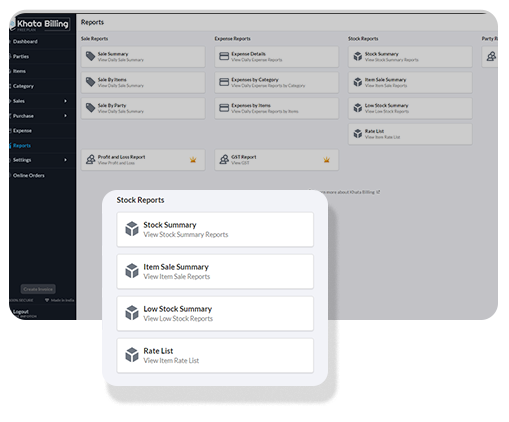
📊 Key Stock Reports Available in KhataBilling
Our platform provides a powerful dashboard and reporting tools to give you a complete overview of your stock performance:
🧩 Assign Assemble Items – Advanced Inventory Bundling
🔧 What is the "Assign Assemble Items" Feature?
Our "Assign Assemble Items" feature is a game-changing tool designed to handle bundled or composite products. It allows you to associate multiple sub-items or components with a main product. This is especially useful for businesses where one product is made from several parts such as PC assemblies, furniture sets, or manufacturing kits.
Once linked, stock updates happen automatically during any transaction, sales, returns, purchases, or purchase returns.
🗂️ How Does It Work?
-
Enable the Feature:
- Edit the product you want to assemble.
- Enable “Assign Assemble Items”.
-
Assign Sub-Items:
- Add all the sub-items/components required to make one unit of the main item.
- Define the quantity for each.
-
Automatic Stock Adjustment:
- When a transaction is recorded for the main item, stock for sub-items is updated accordingly.
💡 Real-World Example: Gaming PC
Suppose you sell a product called Gaming PC. Each unit includes:
- 1× Motherboard
- 2× RAM (8GB)
- 1× Processor
- 1× Power Supply
- 1× SSD (500GB)
- 1× Cabinet
✅ Sales Invoice (3 Gaming PCs)
Automatically reduces:
- Gaming PC: -3
- Motherboard: -3
- RAM: -6
- Processor: -3
- Power Supply: -3
- SSD: -3
- Cabinet: -3
🔄 Sales Return (1 Gaming PC)
Automatically restores:
- Gaming PC: +1
- Motherboard: +1
- RAM: +2
- Processor: +1
- Power Supply: +1
- SSD: +1
- Cabinet: +1
🛒 Purchase (5 Gaming PCs)
Automatically adjusts:
- Gaming PC: +5
- Motherboard: -5
- RAM: -10
- Processor: -5
- Power Supply: -5
- SSD: -5
- Cabinet: -5
🚀 Benefits of "Assign Assemble Items"
- 🔁 Automated Inventory Adjustment – No manual updates needed
- ✅ Error-Free Stock Control – Maintains perfect stock levels
- 🧠 Smart Bundling – Ideal for complex product kits
- 💼 Industry Versatility – Works across retail, manufacturing, electronics, furniture, and fashion
🏭 Additional Industry Use Cases
| Industry | Product Example | Components |
|---|---|---|
| Furniture | Dining Table Set | 1 Table + 4 Chairs |
| Clothing | Men’s Suit | Jacket + Pants + Tie |
| Electronics | Computer or CCTV Setup | Multiple electronic components |
| Manufacturing | Engine Kit | Pistons + Crankshafts + Plugs |
🧠 Why Choose KhataBilling for Inventory?
- Real-time stock updates with every transaction
- Unit-wise tracking including decimal/point quantity
- Sub-item and bundled item tracking
- Comprehensive stock reports
- Multi-industry compatibility
- User-friendly interface with accurate automation
- Separate stock for each godown or shop — see Warehouse Management
🧾 Start Smarter Inventory Management Today
Whether you're a retailer, wholesaler, or manufacturer, KhataBilling helps you maintain control of your stock, streamline your operations, and make informed business decisions. and Sign up today to experience seamless inventory management.
What’s New in Inventory
Recent updates make it faster to set prices, keep stock right and see what needs reordering — from the item list down to each batch and variant.
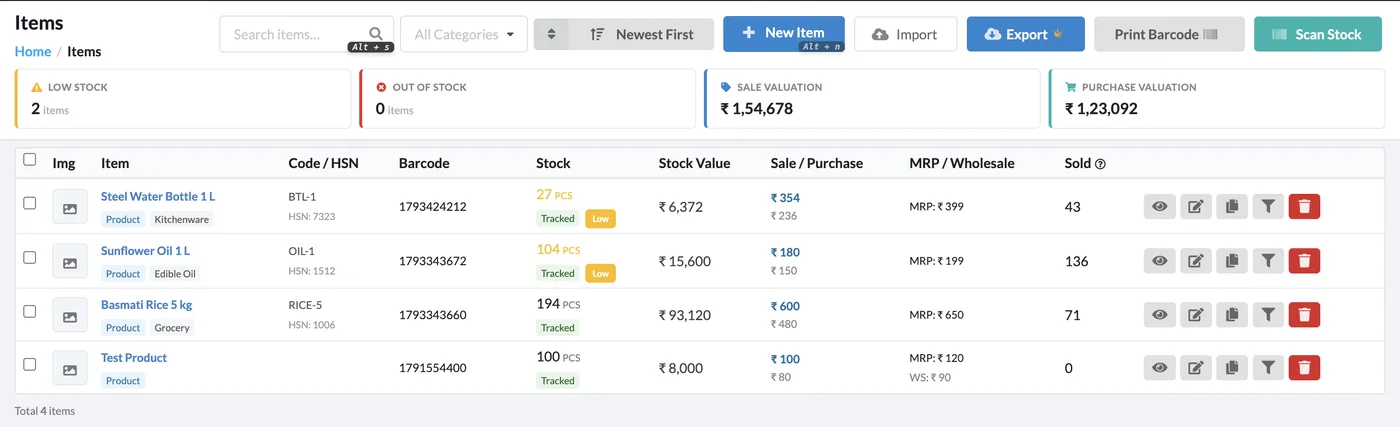
Item List with Stock Health at a Glance
The item list now shows low-stock and out-of-stock counts, sale and purchase valuation, barcode, stock-tracking status and units with colour tags — so you know what to reorder before you open a single item.
- Low Stock and Out of Stock counters on top of the list
- Barcode, MRP and wholesale price columns
- Scan Stock: adjust stock in bulk by scanning barcodes
- Turn stock tracking on/off or clear stock for many items at once
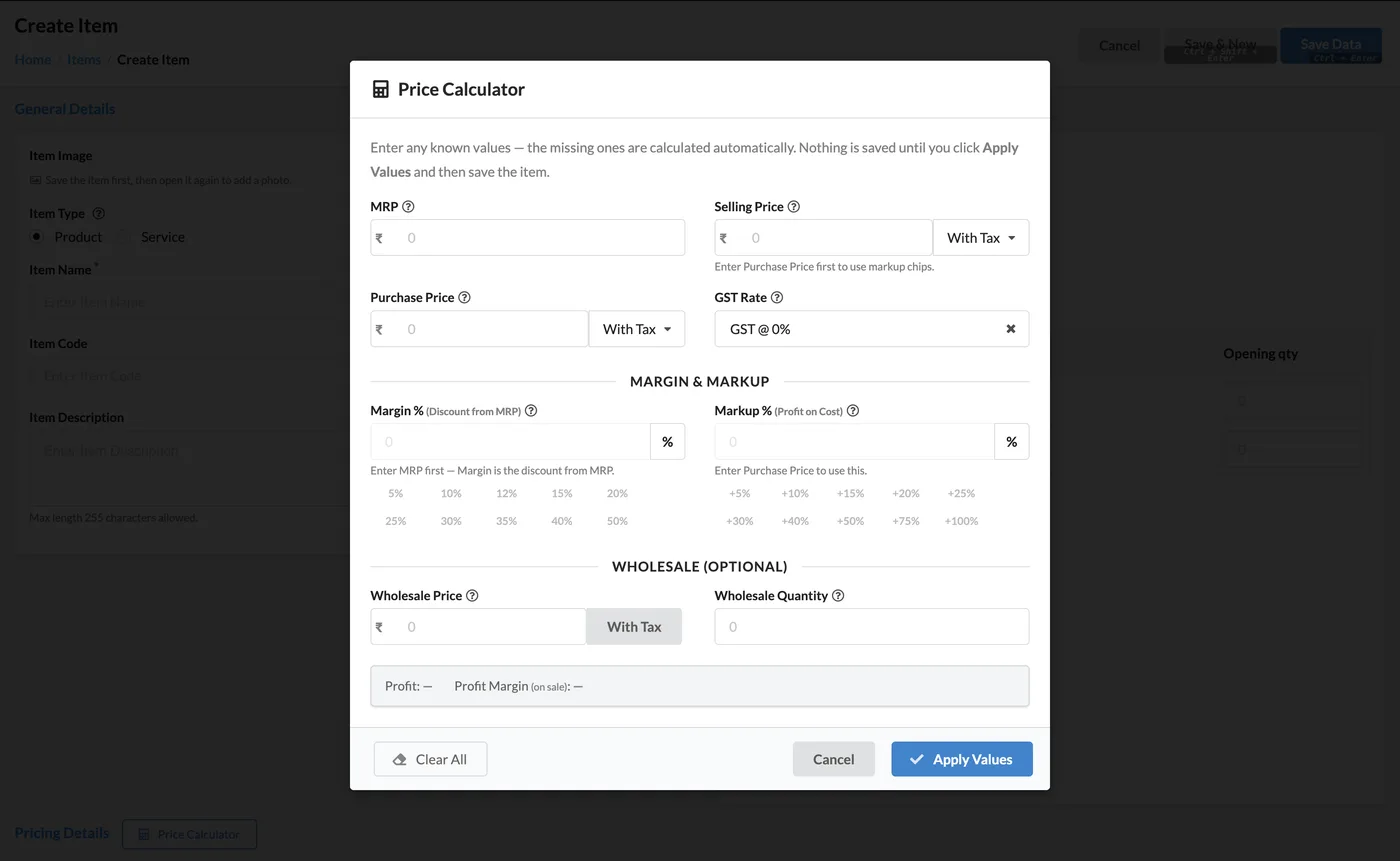
Price Calculator for Sale, Purchase & Wholesale
Enter any known values — MRP, purchase price, margin or markup — and the Price Calculator works out the rest, with or without tax. Nothing is saved until you click Apply Values.
- Margin % (discount from MRP) and Markup % (profit on cost) quick chips
- Inclusive and exclusive GST price calculation
- Optional wholesale price and wholesale quantity
- MRP checks so sale and wholesale prices stay within MRP
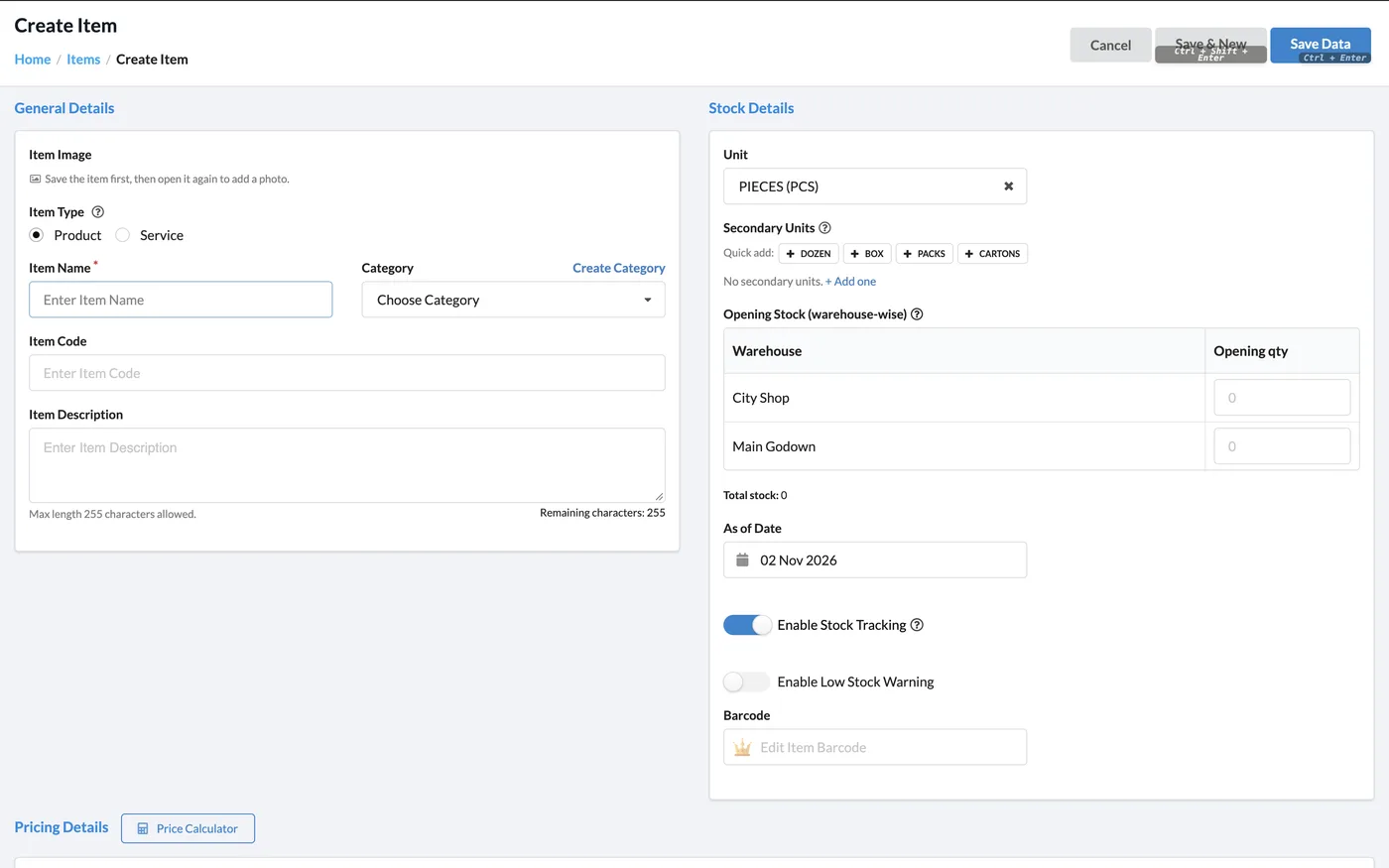
Smarter Item Form: Batches, Variants & Opening Stock per Godown
Choose how an item is stocked — Standard, Track by Batch, Assemble or Variants — add secondary units in one click, and enter opening stock warehouse-wise right on the item form.
- Secondary units with quick-add chips (Dozen, Box, Packs, Cartons)
- Batch and variant details on invoices, item views and PDFs
- Assembled items show component quantity and unit
- Import batches and variants with your item import file
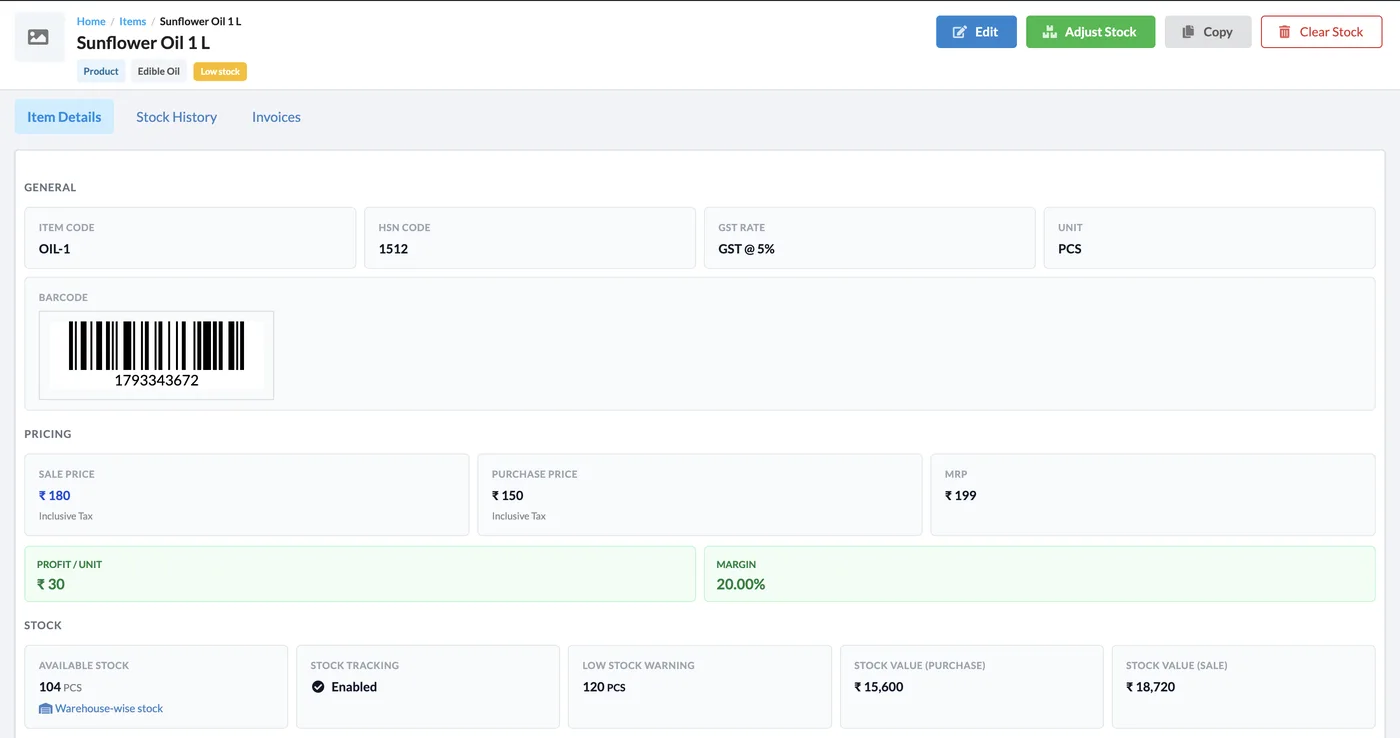
Item View with Profit, Margin & Stock Value
Every item page shows its barcode, prices, profit per unit, margin, stock tracking, low-stock warning level and stock value at purchase and sale price — with Adjust Stock, Copy and Clear Stock buttons on top.
- Adjust Stock clearly says Add Stock or Reduce Stock, and can set stock to zero
- Warehouse-wise stock, including batches and variants
- Party-wise price levels and invoice-type discounts on the item view
- Copy an item to create a similar one in seconds
Party-Type Prices
Set different sale and purchase prices per party type (e.g. retailer, wholesaler, cash, credit). The matching price is applied automatically on the invoice.
Invoice-Type Discounts
Give an item a default discount per invoice type, applied automatically when it is added to that type of bill.
Barcode Scan on Invoices
Scan or type a barcode while adding invoice items — batch and variant barcodes are picked up too, in Invoice and POS.
Category Management
Add or remove items while editing a category, and add or edit items directly from the category page.
Richer Import / Export
Item import and export now carry custom fields, pricing fields and warehouse data.
PTR & Wholesale Rules
PTR calculation for pharma-style pricing, and wholesale prices that apply to sale transactions only (never to service items).
Start Using Khata Billing — 100% Free
GST Billing · Inventory · POS · Payroll · Banking · GST Reports — all in one free app