Every Indian business owner choosing billing software faces the same question: cloud-based or offline? Both have genuine advantages, and the wrong choice can create operational problems that last for years.
This guide gives you an honest, detailed comparison — no brand bias — so you can choose the right architecture for your specific business situation.
✅ Key Takeaways
- Cloud: access from anywhere, any device
- Cloud: automatic backup — data never lost
- Offline: works without internet — fully functional
- Offline: no subscription dependency
- Cloud: real-time sync across multiple locations
- Offline: higher upfront cost, single-device tied
What is Cloud Billing Software?
Cloud billing software runs on remote servers and is accessed through a web browser or app. Your data is stored online — not on your local PC. Examples: Khata Billing, Zoho Invoice, QuickBooks Online.
Key characteristics: requires internet connection to use, data is automatically backed up, accessible from any device (phone, tablet, laptop), updates happen automatically in the background.
What is Offline Billing Software?
Offline billing software is installed on your local PC or device. Data is stored on your hard drive. Examples: Tally Prime, Busy Accounting, Vyapar (desktop version).
Key characteristics: works without internet, data stored locally on your machine, requires manual backup to prevent data loss, tied to the machine where it's installed.
Head-to-Head Comparison
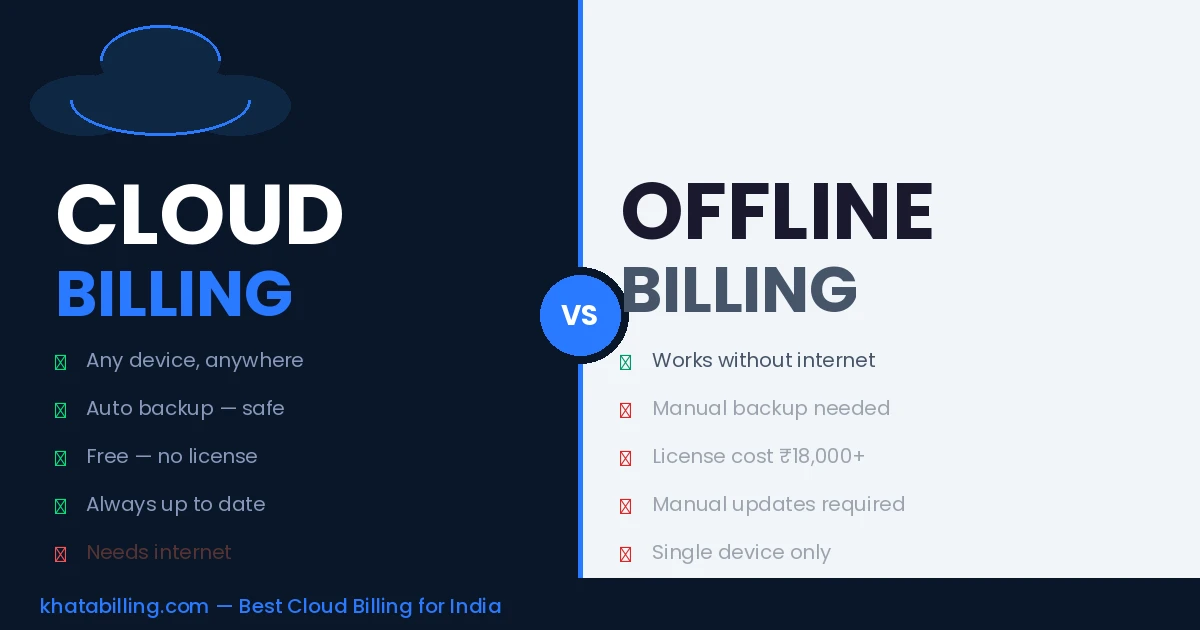
Accessibility: Cloud wins — access from any device, anywhere. Offline is tied to one machine.
Data safety: Cloud wins — automatic backup to secure servers. Offline data can be lost if PC crashes or is stolen.
Internet dependency: Offline wins — works fully without internet. Cloud needs connection.
Cost: Cloud wins — Khata Billing is free. Offline software like Tally costs ₹18,000+.
Multi-location access: Cloud wins — all locations see the same data in real time. Offline is single-location.
Updates: Cloud wins — automatic, no action needed. Offline requires manual updates.
Setup: Cloud wins — zero installation. Offline requires download and installation.
When to Choose Offline Billing Software
Offline billing is the better choice only when:
- Your business location has genuinely unreliable internet — power cuts lasting hours, no mobile data backup
- You operate in a remote area where connectivity is unpredictable
- Your business specifically needs advanced accounting features only available in desktop tools like Tally
For businesses in most Indian towns and cities with 4G mobile network as backup, cloud billing is the safer, more flexible choice.
Why Khata Billing's Cloud Approach Works for Indian Businesses
Khata Billing is built for Indian connectivity realities:
- Works smoothly on 4G mobile connections — no high-speed internet required
- Lightweight interface that loads fast even on slower connections
- Mobile app ensures you can always access billing even when PC is unavailable
- All data backed up automatically — you never lose invoices or stock data
For the vast majority of Indian businesses in 2026, cloud billing software is the better choice — more accessible, safer data, zero setup cost, and free with Khata Billing. Choose offline only if your specific location has chronic internet unavailability.
Start with Khata Billing cloud billing for free — no installation, works on any device, data always safe.