🧾 Create Stylish, Customizable Invoices with KhataBilling

At KhataBilling, we understand that invoices represent your brand. That’s why we provide a powerful and fully customizable invoice system designed to reflect your business identity — whether you're generating sales, purchase, sales return, purchase return, quotation, or challan invoices.

With a wide range of options and settings, you can personalize every aspect of your invoice, ensuring your documents are as professional and polished as your business.
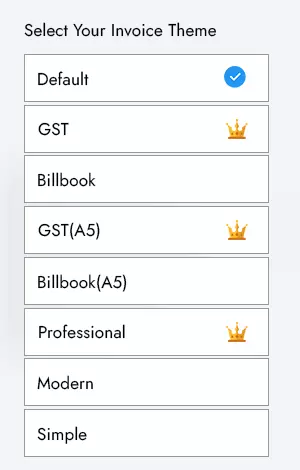
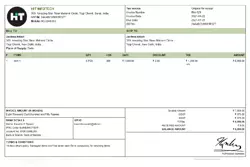
Create a stylish custom invoice

You can customize ​​the content and layout of an invoice to meet the needs of your business

  • Multipurpose Layout

    Khata Billing provide a pre built different layouts

  • Invoice Branding Logo

    Change Invoice Logo Size or Upload Different Logo for all Invoice layouts

  • Change Colors

    You can customize invoice theme color based on branding color

  • Add Signature

    You can also add your own signature

  • ultraland
  • ultraland
  • ultraland

Impress your clients with beautiful, branded invoices

Make your invoices look as professional as your business. Our estimate and invoice templates are designed to be easily understood and look great. Simply choose an invoice template and add your logo.

All of our invoices are completely white-labelled by default. That means there are no Invoice Simple watermarks, so you can truly make them your own.

You can also add your own standard notes, signature, and photos of your business.

🎨 Customizable Invoice Features

📐 Multipurpose Layouts

Choose from multiple pre-built invoice templates to match your business needs. Whether you're in retail, wholesale, or service-based industries, we’ve got a layout that suits you.

🖼️ Invoice Branding Logo
🌈 Change Invoice Theme Colors

Customize invoice colors to match your brand theme and create a consistent visual identity across all your client interactions.

✍️ Add Digital Signature

Add your authorized signature to your invoices to build trust and give a more professional look.

📝 Add Notes & Business Photos

Include standard notes or images (like office/storefront photos or certifications) to personalize your invoices even further.


🧩 Invoice Types You Can Customize

KhataBilling supports the following invoice/document types:

You can duplicate any invoice type with a single click and even convert from one type to another (e.g., turn a Quotation into a Sales Invoice).


🔁 Convert & Duplicate Invoices Easily

Our system allows seamless conversion of document types.
Example:


🔧 Advanced Customization Settings

From the settings panel, you can show/hide invoice elements as needed:

Make your invoices clean or detailed your choice!


🔢 Flexible Invoice Numbering System

KhataBilling provides an auto-generated invoice numbering system to help you save time and maintain consistency. However, you can modify this behavior in two ways:

  1. Auto-Generate Invoice Numbers: Numbers continue from the last entry and are assigned automatically.
  2. Manual Invoice Numbering: Enter invoice numbers manually each time, giving you full control.

You can also define unique invoice number prefixes for each invoice type, such as:


🎯 White-Labeled, Professional Look

All invoices are completely white-labeled there are no third-party watermarks, so your brand takes center stage. Impress your clients with clean, branded, and fully customizable invoices that reflect the professionalism of your business.


✅ Key Benefits at a Glance

Feature Description
Custom Layouts Choose from pre-designed formats
Branding Options Add logo, colors, signature, and business images
Multipurpose Document Types Sales, Purchase, Quotation, Returns, Challan
Convert Between Types Easily convert and duplicate invoice types
Show/Hide Fields Control visibility of contact details, GST, UPI, etc.
Flexible Numbering Auto or manual invoice numbering with type-wise prefixes
100% White-Labeled No third-party branding – it’s all yours

🚀 Build Your Brand with Every Invoice

Your invoice is more than just a bill it's a reflection of your business. With KhataBilling, you can create stunning, clear, and customizable invoices that speak volumes about your professionalism and attention to detail.

New & Improved

What’s New in Invoicing

More control over what your invoices show, how they are numbered and how they look when printed — plus a cleaner invoice view with tax and payment details in one place.

An Invoice View That Tells the Whole Story

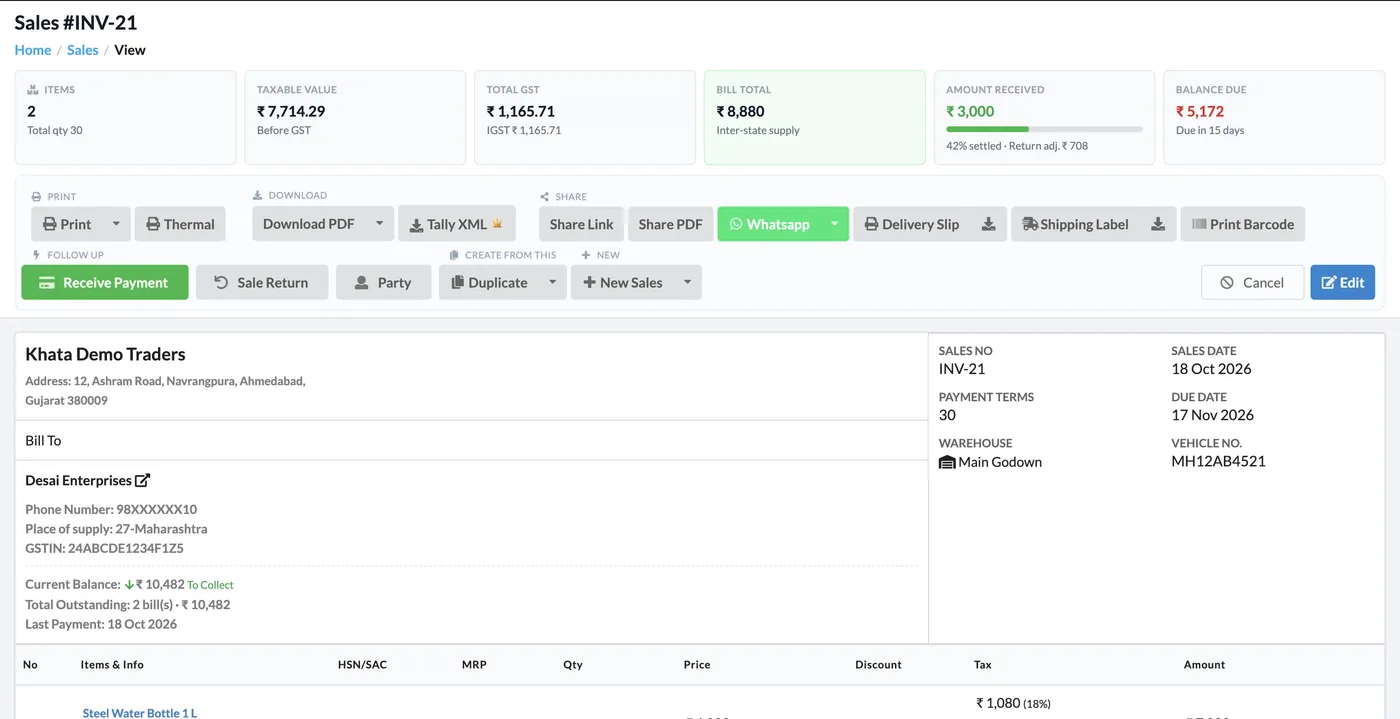
Every invoice now opens with a summary strip — items, taxable value, GST, bill total, amount received and balance due — and shows the party’s current balance, total outstanding and last payment right under their name.

  • Print, Thermal, Download PDF, Tally XML, Share Link and WhatsApp in one toolbar
  • Create a Sale Return, Delivery Slip or Shipping Label straight from the invoice
  • Warehouse and vehicle number shown on the bill
  • Invoice history: who created and changed the document, and when
Khata Billing sales invoice view with summary cards and party balance

HSN/SAC-wise Tax Summary

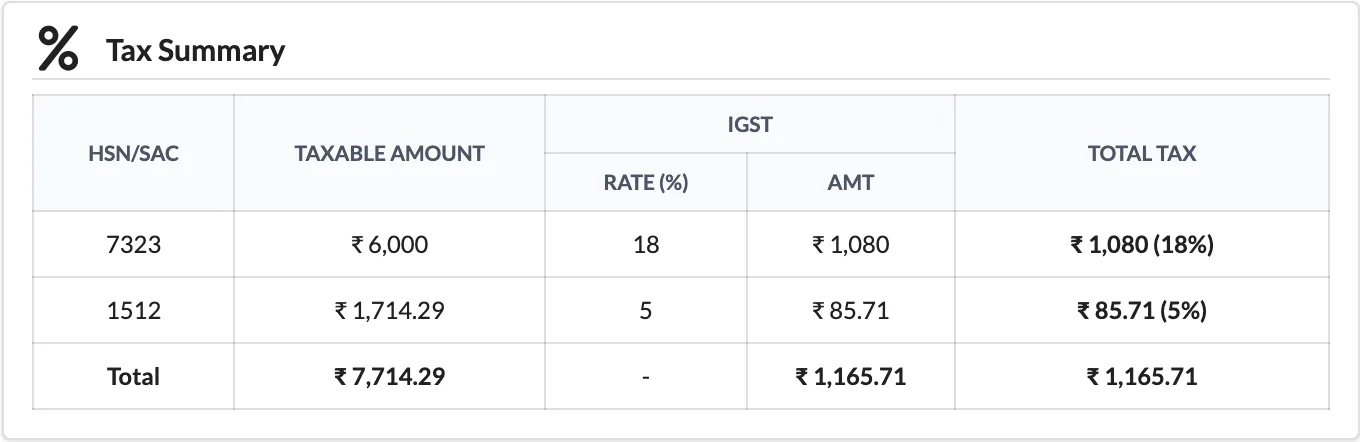
A tax summary table groups the invoice by HSN/SAC code with taxable amount, CGST/SGST or IGST rate and amount, and CESS where it applies — on screen, in GST and Formal PDF themes and on thermal prints.

  • Shows CGST + SGST for intra-state and IGST for inter-state bills
  • Works for item-wise GST and for invoice-level (overall) GST
  • Composition declaration text when your GST type is Composition
HSN/SAC wise tax summary on a Khata Billing invoice

Invoice Settings You Asked For

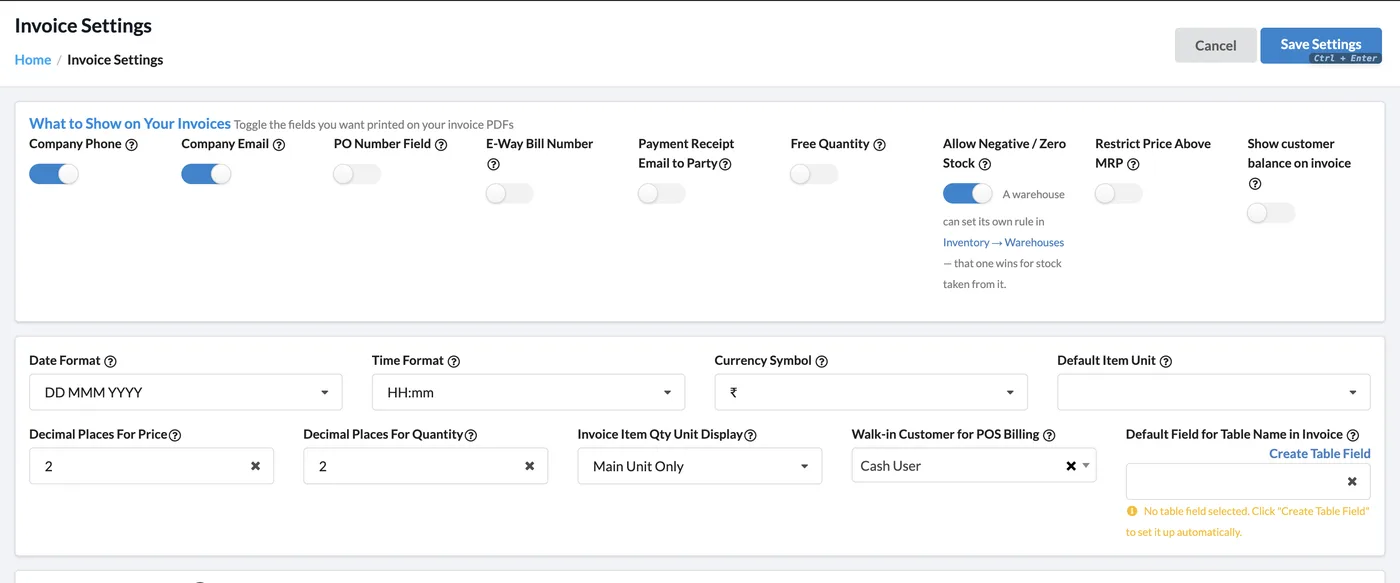
Choose what prints on your invoices and how numbers work — per invoice type. Show the customer’s balance on the invoice, show the unit after the quantity, allow duplicate invoice numbers, or let price go above MRP.

  • Show customer balance on invoice (after the invoice total)
  • Choose how the quantity unit and secondary unit show on invoice items
  • Manual or automatic prefix for every invoice type, editable while billing
  • Pre-filled extra charges with percentage or fixed amount
Invoice Settings page with show customer balance and quantity unit display options

One Invoice List for Every Document

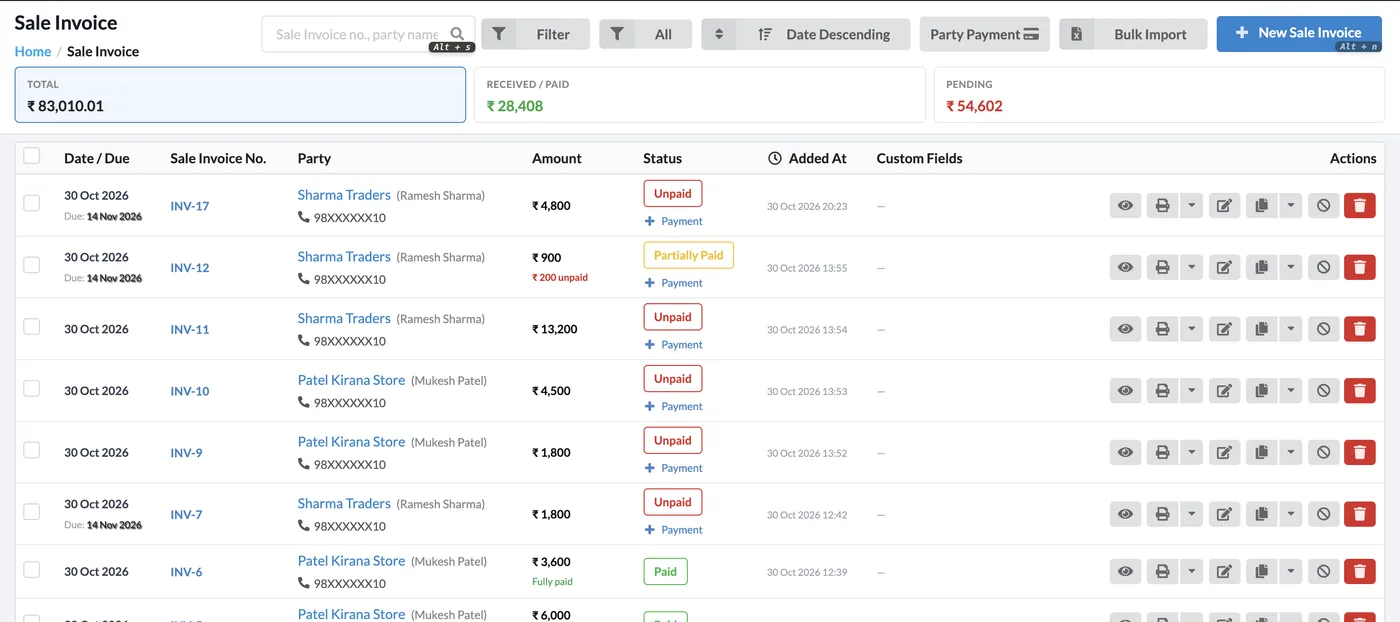
Sales, quotations, challans, orders, proforma, purchases and returns share one consistent list with filters, totals and quick actions. POS and Online Store bills carry their own badge, and you can download many invoices at once.

  • Total, received/paid and pending amounts on top
  • Paid, Unpaid and Partially Paid status with balance left
  • Bulk import for every invoice type, including custom fields
  • Party mobile number and custom fields in the list
Sale invoice list with total, received and pending amounts

Custom Watermark

Add your own watermark image to invoices — it prints on screen and in downloaded PDFs.

Paid / Unpaid Badges

Fully paid invoices print with a paid status symbol; partially paid ones show a clean badge.

Vertical Item Borders

Default, Simple, Modern, Elegant and Formal themes can show vertical borders in the item table, even with minimum item rows.

Additional Charges

Add charges such as freight, VAT, TDS or your own — as a percentage or fixed amount, with tax.

Internal Notes

Invoice-level and party-wise internal notes that are never printed — visible only to you and your staff.

Thermal Print Upgrades

Logo/image on thermal receipts, font-size settings and HSN-wise GST summary on thermal bills.

Start Using Khata Billing — 100% Free

GST Billing · Inventory · POS · Payroll · Banking · GST Reports — all in one free app

Sign Up Free → Login