Reporting
📊 Powerful Business Reporting Made Simple with Khata Billing
Khata Billing offers a wide range of smart, insightful, and user-friendly business reports to help you stay on top of your financials, sales, stock, expenses, and party transactions — all from a single dashboard. Whether you're a small business, wholesaler, or retailer, our reporting system ensures you never miss a detail.
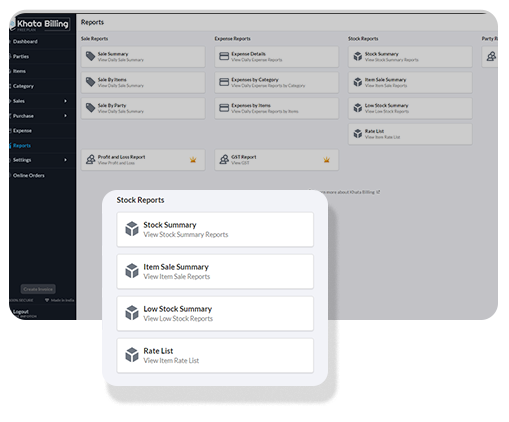

Sale Summary
Get a quick snapshot of your total sales, receipts, and outstanding payments for the selected day.

Sale By Items
Track which items are performing best by analyzing quantity sold and revenue generated.

Sale By Party
Analyze sales trends for individual customers or parties and monitor their outstanding dues.

Expense Details
Review all your expense entries including date, amount, and mode of payment in a single place.

Expense by Category
Understand where your money goes by grouping expenses into categories like rent, utilities, etc.

Expense by Items
Break down expenses by specific items or services to identify cost-heavy purchases.

Estimate Register
View all issued estimates with status tracking to manage potential sales opportunities.

Quotation Register
Access detailed records of all quotations issued along with their conversion status.
📊 Reports & Analytics
Get complete visibility into your business with easy-to-use reports.
🧾 Sales Reports – Track Your Revenue Easily
- Sales Summary Reports: Get a clear overview of your total sales over any selected date
range.
→ Ideal for understanding overall business performance. - Daily Sales Report: Monitor daily transactions to know how much you're earning each
day.
→ Great for daily business tracking and cash flow analysis. - Sales by Item Report: View which products are performing best based on quantity and
revenue.
→ Helps identify top-selling items and inventory trends. - Sales by Party Report: Track sales made to individual customers or businesses.
→ Analyze customer-wise business to identify loyal or high-volume buyers.
💸 Expense Reports – Keep Your Spending in Check
- Expense Summary: Get a complete list of all business expenses recorded.
→ Know where your money is going. - Daily Expense Report: See all expenses recorded on a day-to-day basis.
→ Useful for controlling small daily operational costs. - Expenses by Category: Break down expenses by predefined categories like Rent, Salary,
Office Supplies, etc.
→ Helps identify high-cost areas and optimize budgeting. - Expenses by Item: View expense reports linked to specific items.
→ Useful for understanding item-based cost breakdowns.
📦 Stock Reports – Monitor Inventory Like a Pro
- Stock Summary Report: Get a snapshot of your available inventory across all
products.
→ Perfect for checking stock balance and availability. - Item-wise Sales Summary: Understand how each product is performing in terms of
sales.
→ Helps in decision-making about stock restocking or discontinuation. - Low Stock Alerts: Identify products that are running low in stock.
→ Prevent out-of-stock situations and lost sales. - Rate List Report: Check current selling rates of all items in one place.
→ Ideal for printing or sharing with customers or staff. - Stock Valuation Report: Know the total value of your inventory based on quantity and
item rate.
→ Essential for accounting and profitability analysis.
🧾 Party Reports – Track Customers & Vendors Smartly
- Party-wise Outstanding Report: See how much each party (customer/vendor) owes or is
owed.
→ Helps with payment follow-ups and credit control. - Invoice-wise Ledger: Track ledger entries invoice-by-invoice.
→ Gain clarity on each transaction at invoice level. - Party Ledger Report: Complete transaction history of each party including invoices,
payments, and outstanding.
→ Best for reconciliation and trust-building with parties.
💹 Profit, Tax & GST Reports – Know Your Business Health
- Profit & Loss Report: Track total revenue, cost of goods, expenses, and net profit for any period.
→ Crucial for financial planning, investor reporting, and CA audits. (Premium) - GST Invoice Report: View GST-wise invoice details with CGST, SGST, IGST breakup per invoice.
→ Useful for filing accurate monthly/quarterly GST returns. - GST Invoice Item Report: See GST details per item sold — rate, CGST, SGST, and taxable value.
→ Required for accurate HSN-based filing. - GSTR-1 Report: Auto-generated GSTR-1 format with invoice-wise, party-wise, and HSN-wise data.
→ Save hours during tax season. (Premium) - ITC (Input Tax Credit) Register: Track input tax credit available across purchase invoices.
→ Essential for businesses claiming GST credits. (Premium) - HSN Summary Report: View sales grouped by HSN codes with taxable value and GST amounts.
→ Required for GSTR-1 HSN summary filing. (Premium)
🏦 Banking & Accounting Reports – Stay on Top of Your Finances
- Day Book: A chronological log of all transactions on any given day — sales, purchases, expenses, receipts, and payments.
→ Ideal for daily reconciliation and cash management. (Premium) - Bank Account Statement: View a complete statement for each bank or cash account — all credits, debits, transfers, and closing balance.
→ Essential for bank reconciliation. (Premium) - Invoice-wise Outstanding Report: See every invoice that is pending, partially paid, or overdue across all parties.
→ Helps follow up on receivables and payables efficiently. - Payment Ledger: Track all payments received and made across any date range by account or party.
→ Gives a clear picture of cash flow.
👥 Staff & Payroll Reports – Manage Your Team Transparently
- Attendance Report: Monthly attendance summary for each staff member — working days, leaves, late arrivals.
→ Used for payroll calculation and leave management. (Premium) - Salary Register: Complete payroll summary with salary details, deductions, advances, and net pay for each employee.
→ Useful for audit, compliance, and HR review. (Premium) - Advance Register: Track salary advances given to employees and how they’re being recovered each month.
→ Prevents payroll confusion and advance miscalculation. (Premium) - Staff Activity Log: Full audit trail of all actions performed by each staff member.
→ Ensures accountability and security oversight. (Premium)
🔍 Why Choose Khata Billing for Reports?
- ✅ 20+ reports covering sales, stock, GST, banking, staff, and more
- ✅ Easy-to-understand layout — no accounting knowledge needed
- ✅ Filter by date range, party, item, category, and more
- ✅ Export to Excel or PDF with one click
- ✅ Print-ready reports for audits and CAs
- ✅ All reports accessible from a single dashboard
🎯 Designed for Business Owners, Not Accountants
Whether you’re running a retail shop, wholesale distribution, manufacturing unit, or service business — Khata Billing gives you real-time, actionable insights without needing any accounting expertise.
📈 Grow faster, track smarter — with Khata Billing.
Start Free — Access All ReportsWhat’s New in Reports
Find any report with search, filter by several invoice types at once, export with percentage-of-total columns and send reports straight to your CA.
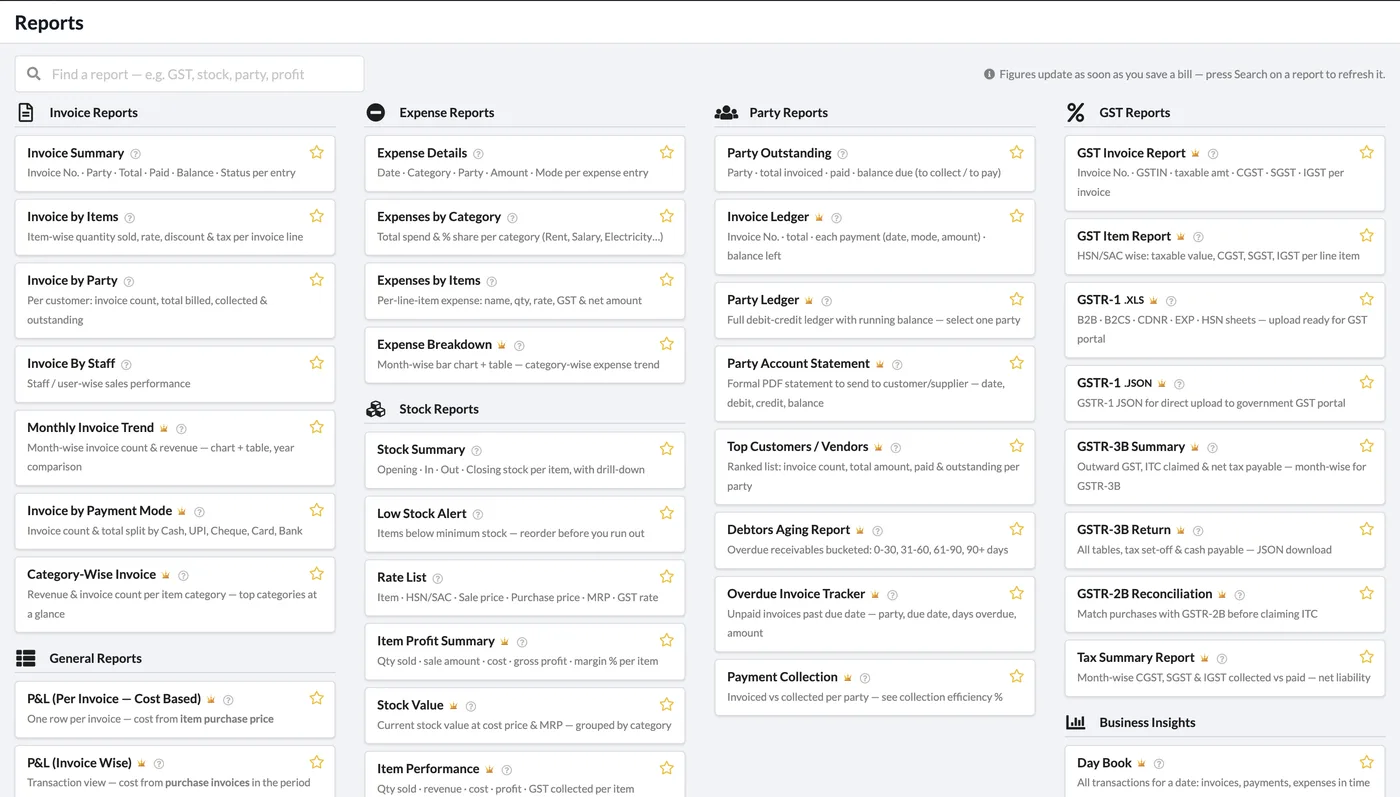
All Reports, One Searchable Page
Reports are grouped into Invoice, General, Expense, Stock, Warehouse, Party, GST and Business Insight sections. Type in the search box to find a report, and star the ones you use most.
- Invoice By Staff report for staff-wise sales performance
- Multi-select Invoice Type and Status filters on invoice reports
- Multi-category filters on stock, rate list and expense reports
- Send to CA button next to Export on supported reports
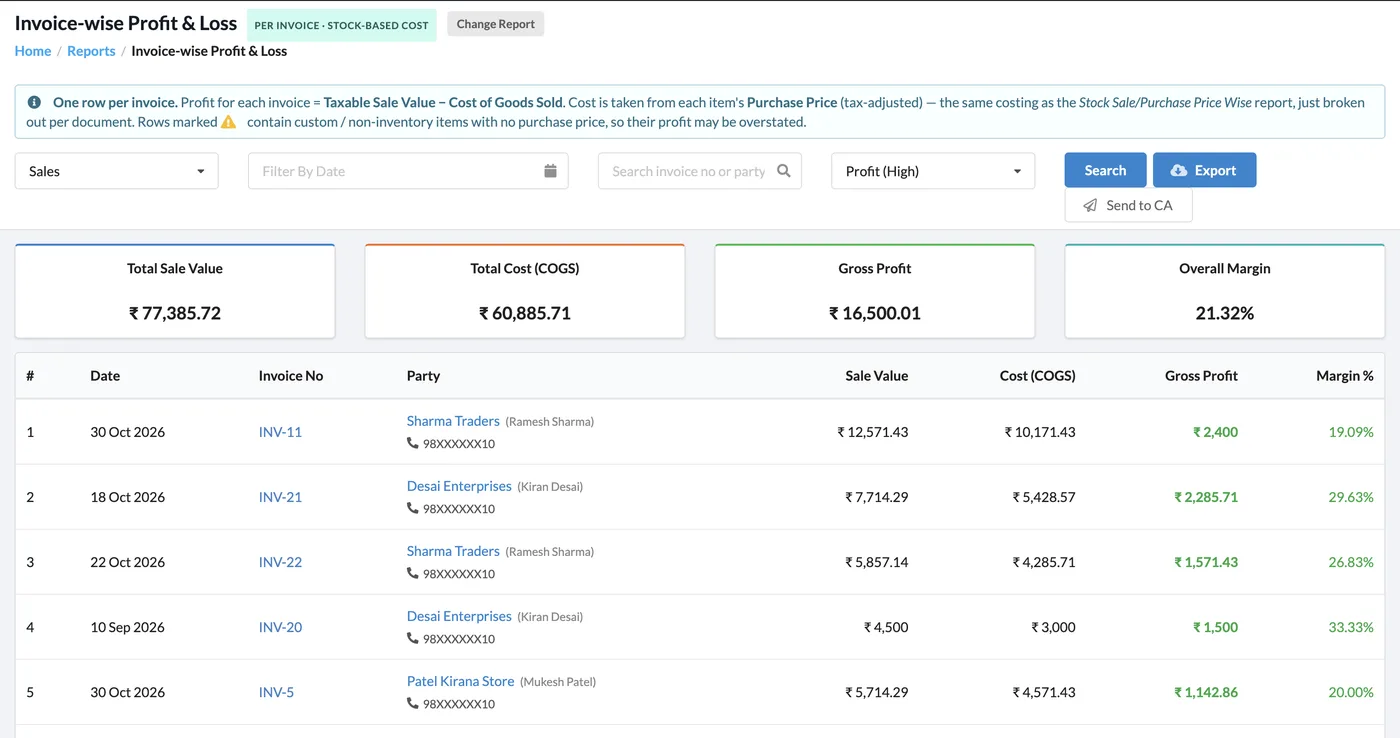
Profit & Loss per Invoice
The new Invoice-wise Profit & Loss report gives one row per invoice: sale value, cost of goods sold from each item’s purchase price, gross profit and margin %, with totals on top.
- Total sale value, total cost (COGS), gross profit and overall margin cards
- Sort by highest or lowest profit
- Flags rows where an item has no purchase price
- Improved Invoice-wise and Stock-wise P&L reports with extra filters and download
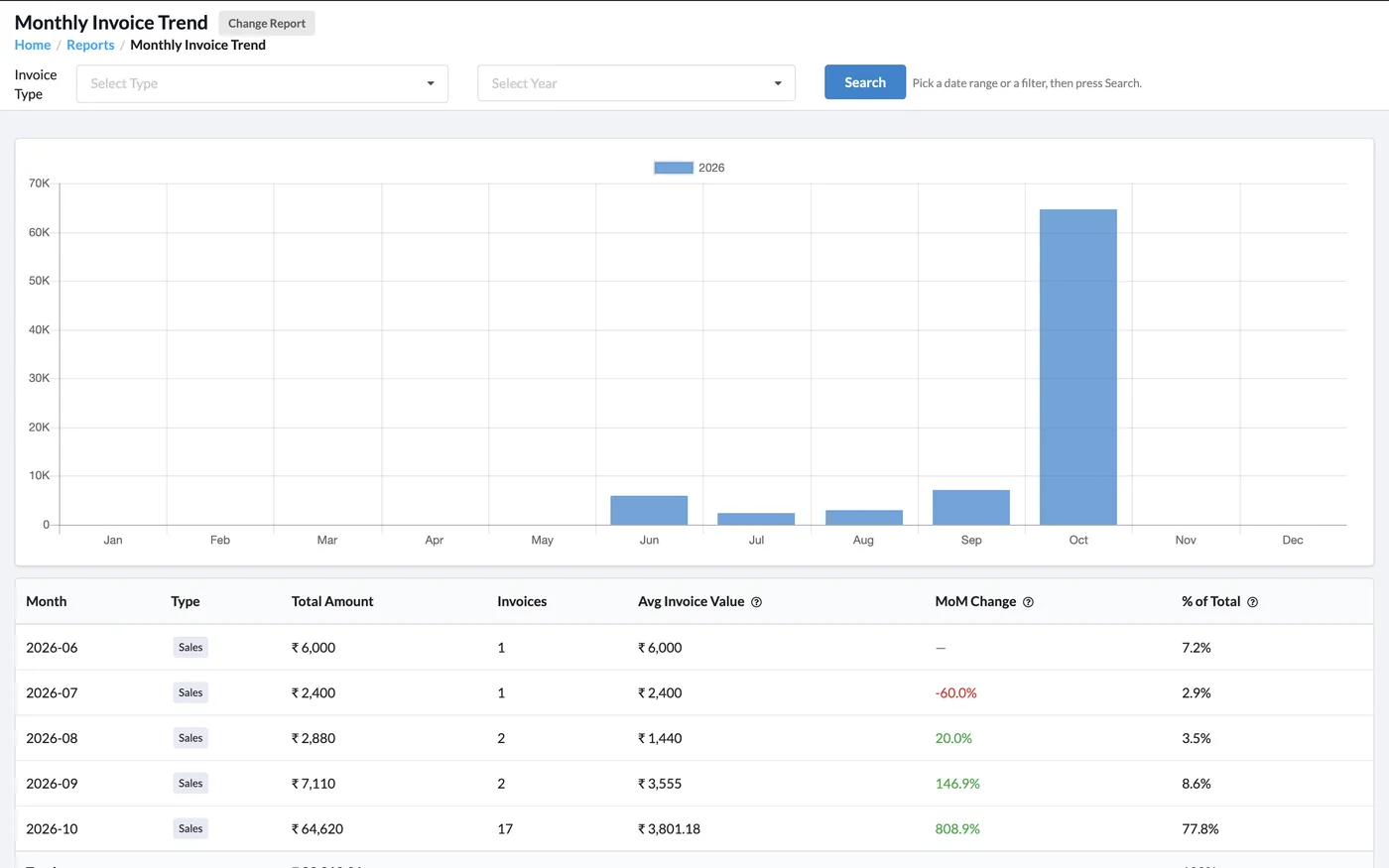
Monthly Invoice Trend with Chart
See month-wise invoice count and revenue on a chart, compare years, and filter by invoice type. The export includes average invoice value, month-over-month change and percentage of total.
- Multi-year comparison on the same chart
- MoM change highlighted in green or red
- Percentage of total also added to Payment Mode, Category-Wise and Expense by Category exports
Staff Ledger
Salary, advances and attendance per staff member in one ledger.
Party Statement CSV
Party Account Statement can now be exported as CSV as well as PDF.
HSN/SAC Filters
Filter and export Invoice-wise Items and All Stock reports by HSN/SAC code.
Customer Mobile Column
Customer mobile numbers in report listings and exports where it helps follow-up.
Business Pulse
Today’s snapshot, monthly overview, receivables aging and last-7-days sales on one screen.
CA & Report Emails
Save your CA once and email reports in one click or on a schedule.
Start Using Khata Billing — 100% Free
GST Billing · Inventory · POS · Payroll · Banking · GST Reports — all in one free app