WorkFlow automation
🔄 Invoicing Workflow Automation in KhataBilling
Simplify your entire billing process from quotation to invoice to payment tracking with smart workflow automation.
⚙️ What is Workflow Automation in KhataBilling?
Workflow automation allows you to manage your entire invoicing cycle without repeating data entry. You can:
- Start from a Quotation
- Convert into a Sales Invoice
- Generate a Delivery Challan
- Record Payments manually
- Create Return Invoices if needed
🧾 Supported Invoice Types
| Document Type | Purpose |
|---|---|
| Quotation/Estimate | Send price offers to clients |
| Sales Invoice | Final billing after quotation or direct |
| Purchase Invoice | Record purchases from vendors |
| Sales Return | Create returns for sold items |
| Purchase Return | Return items purchased |
| Delivery Challan | Optional goods delivery slip |
| Payment Entry | Manually record full or partial payment |
🔁 Flexible Workflow
- Skip Quotation and directly create Invoice
- Create only Challan for delivery
- Enter manual payment records later
- Create return invoices any time
🧩 Convert & Duplicate Invoice Types Easily
- Convert a Quotation into a Sales Invoice
- Duplicate a Purchase Invoice for repeated vendors
- Convert a Sales Invoice into a Sales Return
💳 Manual Payment Tracking
- Mark invoices as Paid, Partially Paid, or Unpaid
- Enter payment date and amount manually
- Filter based on payment status
🔧 Invoice Settings That Match Your Workflow
- Auto/Manual Invoice Numbering
- Prefix per type (SAL-, PUR-, etc.)
- Show/Hide Company Phone, Email
- Show/Hide GST & UPI QR
- Customize “Bill of Supply” Heading
📊 Workflow Status Reporting
- Track Pending Quotations
- Unpaid/Partially Paid Invoices
- Overdue by date
- See invoices with Returns
- Monitor Total Collected Amount
✅ Why Use KhataBilling Workflow?
| Benefit | Description |
|---|---|
| 🚀 Speed up billing | Easily duplicate or convert documents |
| 🔄 Flexible Process | Start from any point |
| ✍️ Manual Control | Mark payments manually |
| 🧾 All Types Supported | Sales, Purchase, Return, Quotation, Challan |
| 📊 Status Tracking | Visual invoice progress in dashboard |
| ⚙️ Configurable Settings | Customize data shown on invoice |
🚀 Start Automating Your Billing Workflows Today
Bring speed, consistency, and structure to your invoicing without losing manual control.
Get StartedNew Ways to Automate Routine Work
Let Khata Billing create repeat bills, send your daily summary and email reports to your CA — so you spend less time on routine entries.
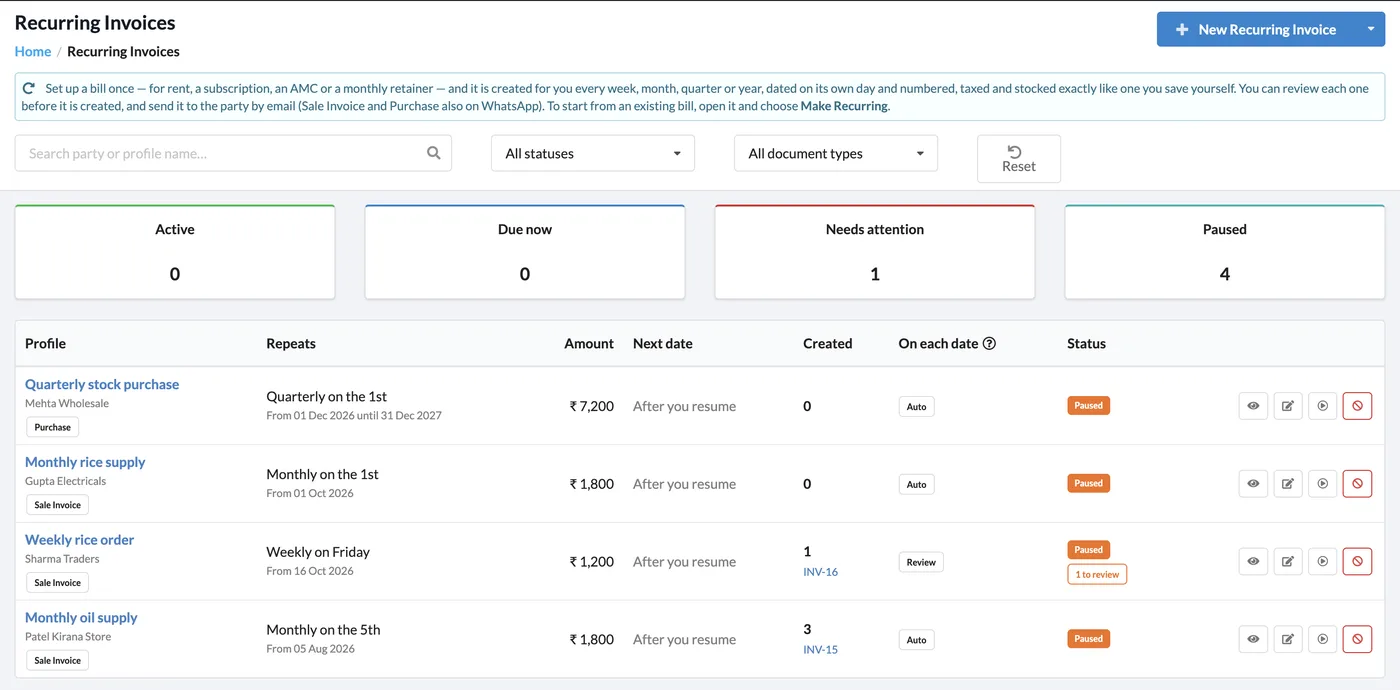
Recurring Invoices
Set up a bill once — rent, a subscription, an AMC or a monthly supply — and it is created for you every week, month, quarter or year, dated and numbered automatically. Pause, resume or review each one.
- Works for sale invoices and purchases
- Auto-create, or create for review before it goes out
- Active, due now, needs attention and paused counters
Daily Business Summary Email
A once-a-day email with sales, payments, dues and low stock (Premium; needs a verified email).
CA & Report Emails
Email any report to your CA in one click, or schedule it weekly or monthly.
Keyboard Shortcuts
Enter, Ctrl + Enter, Esc and Ctrl + Delete, plus search and create shortcuts on invoice, party, item, expense, category and payment pages.
Start Using Khata Billing — 100% Free
GST Billing · Inventory · POS · Payroll · Banking · GST Reports — all in one free app