- Understanding GST Invoice Types
- CGST vs SGST vs IGST — Which Applies to Your Invoice?
- Step-by-Step: Generate a GST Invoice Using Khata Billing
- Step 1 — Create Your Free Account
- Step 2 — Add Your Products or Services
- Step 3 — Start a New Invoice
- Step 4 — Add Customer Details
- Step 5 — Add Line Items
- Step 6 — Review the Invoice Summary
- Step 7 — Share the Invoice
- GST Invoice Rules You Should Know
- Frequently Asked Questions
Every GST-registered business in India must issue a correct GST invoice for every taxable sale. Get it wrong — a missing GSTIN, wrong tax type, or incorrect HSN code — and your customer loses their Input Tax Credit, creating disputes that damage business relationships.
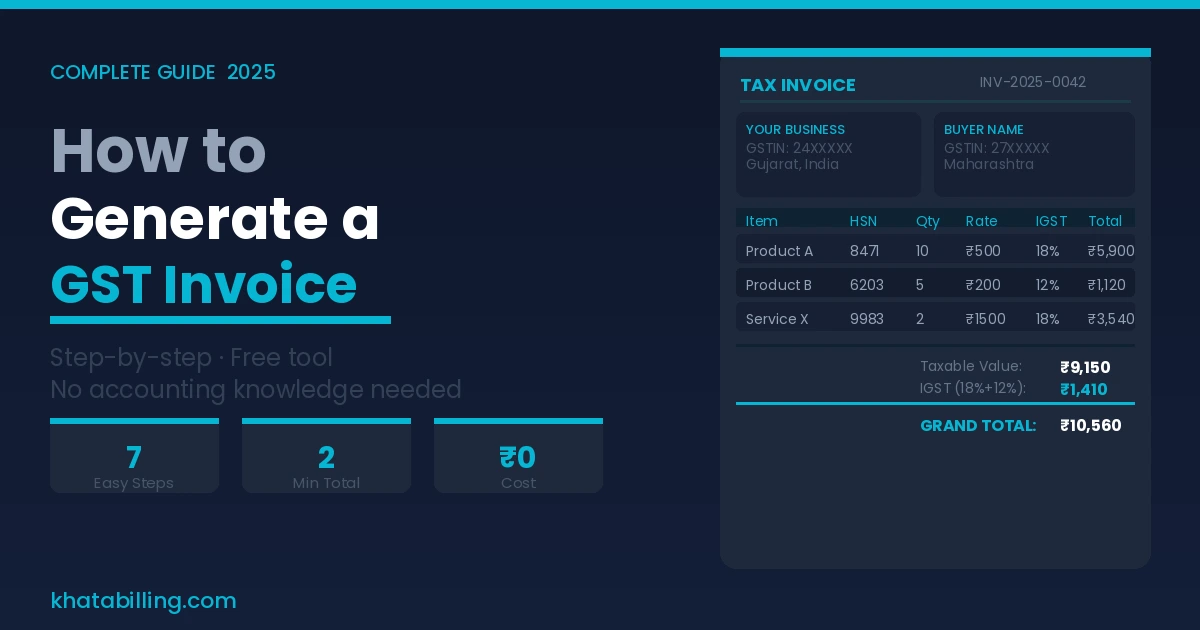
The good news: generating a correct GST invoice takes under 2 minutes with the right tool. This guide explains exactly what a GST invoice requires and how to generate one for free using Khata Billing.
✅ Key Takeaways
- Supplier name, full address, and GSTIN
- Consecutive invoice number and invoice date
- Buyer's name, address, state, and GSTIN (for B2B)
- Place of supply — determines CGST/SGST or IGST
- HSN code (goods) or SAC code (services) for every line item
- Item description, quantity, unit, and unit price
- Taxable value (price before GST)
- GST rate per item and tax amount (CGST+SGST or IGST)
- Total invoice value in numbers and words
- Supplier's authorised signature or digital signature
Understanding GST Invoice Types
Before generating, know which document type you need:
- Tax Invoice: Issued by regular GST taxpayers for taxable goods or services. This is the standard GST invoice that allows ITC claim by the buyer.
- Bill of Supply: Issued when goods/services are GST-exempt, or by a Composition Scheme dealer. No GST is charged — so no ITC is available.
- Debit Note: Issued when the original invoice value was lower than actual — to increase the taxable value.
- Credit Note: Issued when goods are returned, or original invoice value was higher than actual — to reduce the taxable value.
For most businesses doing regular taxable sales, you'll issue a Tax Invoice. Khata Billing generates all four types.
CGST vs SGST vs IGST — Which Applies to Your Invoice?
This is the most commonly misunderstood part of GST invoicing:
- Same state transaction: Both supplier and buyer are in the same state → Apply CGST + SGST (each at half the total GST rate). Example: GST 18% → CGST 9% + SGST 9%.
- Inter-state transaction: Supplier and buyer are in different states → Apply IGST at the full GST rate. Example: GST 18% → IGST 18%.
- Export: Zero-rated supply — 0% GST with option to claim refund of input taxes.
Khata Billing does this automatically. Enter the buyer's state, and the software applies the correct tax type. You never need to manually select CGST/SGST vs IGST.
Step-by-Step: Generate a GST Invoice Using Khata Billing
Here is the complete process from account creation to invoice delivery:
Step 1 — Create Your Free Account
Go to khatabilling.com and sign up. Enter your business name, address, and GSTIN. Upload your logo if you want it on invoices. This is a one-time setup — all future invoices use these details automatically.
Step 2 — Add Your Products or Services
Before creating invoices, add your products/services to your catalogue:
- Product name
- HSN code (goods) or SAC code (services) — use the built-in search
- Default selling price
- GST rate (5%, 12%, 18%, or 28%)
- Unit of measurement (piece, kg, box, hour, etc.)
- Opening stock quantity (for inventory tracking)
Add all products once. When creating invoices, just select from your list — no re-entering details ever.
Step 3 — Start a New Invoice
Click New Invoice. Your business details are pre-filled. The invoice number is auto-assigned as the next sequential number — GST requires consecutive numbering with no gaps, and Khata Billing handles this automatically.
Step 4 — Add Customer Details
Search for an existing customer or add a new one:
- Customer name and full address
- State (this triggers the CGST/SGST vs IGST decision automatically)
- GSTIN — mandatory for B2B. Khata Billing can verify GSTIN validity instantly.
- Credit terms (if you extend credit — e.g., 30 days payment)
Step 5 — Add Line Items
Search your product catalogue and tap to add each item. Enter quantity. Khata Billing auto-fills:
- Unit price from your saved product
- HSN/SAC code
- GST rate
- Tax amount (CGST+SGST or IGST based on customer state)
- Line total (taxable value + GST)
Add a discount if applicable — GST recalculates on the discounted value. Add as many line items as needed.
Step 6 — Review the Invoice Summary
Before saving, review:
- Total taxable value
- Total CGST and SGST (or IGST)
- Grand total in figures
- Amount in words (mandatory on GST invoice)
- Payment due date (if credit terms applied)
Everything correct? Click Save Invoice.
Step 7 — Share the Invoice
Your GST invoice is generated. Now send it to your customer:
- PDF Download — saves a professional, print-ready PDF
- WhatsApp Share — one tap sends the invoice PDF directly to your customer's WhatsApp
- Email — send via email if preferred
Total time from opening the form to the customer receiving the invoice: under 2 minutes.
GST Invoice Rules You Should Know
A few compliance rules that Khata Billing helps you follow automatically:
- Timing: For goods, invoice must be issued before or at the time of supply. For services, within 30 days of service completion (45 days for banks/NBFCs).
- Invoice numbering: Must be consecutive within a financial year. Cannot skip numbers. Khata Billing auto-assigns sequential numbers.
- Minimum threshold: B2C invoices below ₹200 can be aggregated into a single invoice for GSTR-1 purposes.
- e-Invoicing: Mandatory for businesses with turnover above ₹5 crore. Khata Billing supports e-invoice generation and IRN (Invoice Reference Number) fetching.
Generating a correct GST invoice is not complicated when you have the right tool. Khata Billing handles every compliance requirement automatically — correct tax type, sequential numbering, HSN codes, and compliant format — so you can focus on your business instead of rules.
Create your free account at khatabilling.com and generate your first GST invoice right now. No credit card, no installation, no training needed.