Tally Export (XML)
Bill in Khata Billing.
Your CA Keeps Tally.
Many accountants work in Tally. Khata Billing exports your sales, sales returns, purchases and purchase returns as one XML file that already contains the party ledgers, stock items and GST ledgers they need — so it imports directly, without creating anything by hand first.
What You Can Do
- Export sales invoices, sales returns, purchases and purchase returns
- Pick any date range
- Party ledgers created as Sundry Debtors / Creditors with GSTIN, state and address
- Stock items created with unit and HSN code
- Output and input CGST, SGST, IGST, sales, purchase and discount ledgers included
- Import into TallyPrime or Tally ERP 9
- Safe to re-import — existing records are updated, not duplicated
- Send the file to your CA from the same screen
One XML File
Masters + vouchers
Party Ledgers
Auto-created with GSTIN
Stock Items
With unit & HSN
Re-import Safe
No duplicates
See It in the App
Real screens from Khata Billing — sample data shown.
Everything Tally Needs, in One Download
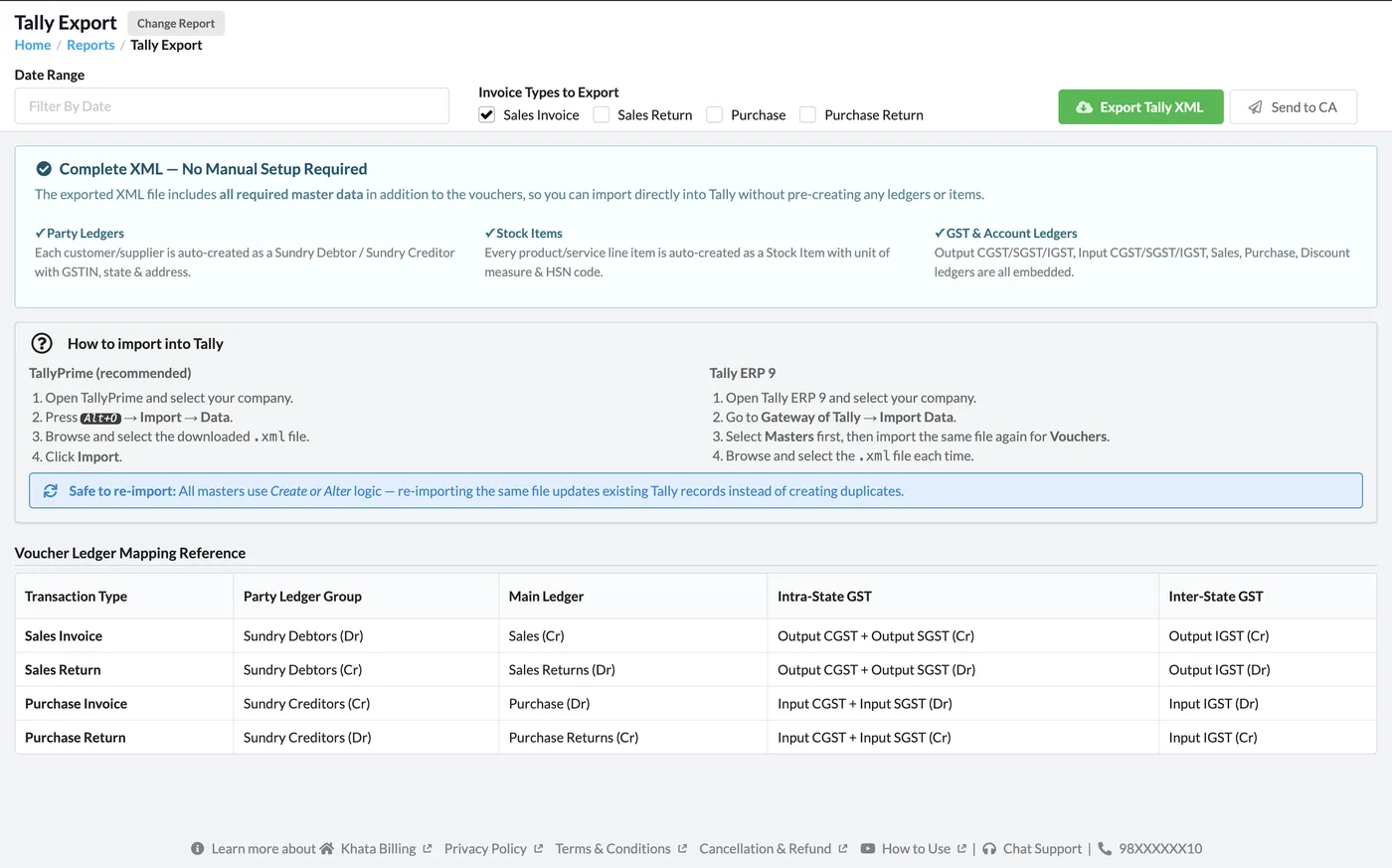
Choose the date range and invoice types and click Export Tally XML. The page shows how to import into TallyPrime and Tally ERP 9, and a voucher-to-ledger mapping table so your CA knows exactly where each entry goes.
- Sales → Sales (Cr), Sundry Debtors (Dr), Output GST
- Purchases → Purchase (Dr), Sundry Creditors (Cr), Input GST
- Intra-state CGST + SGST, inter-state IGST
How It Works
Open Tally Export
Go to Reports → Tally Export.
Choose period and types
Pick the date range and tick Sales Invoice, Sales Return, Purchase and Purchase Return as needed.
Export XML
Click Export Tally XML, or Send to CA to email it.
Import into Tally
In TallyPrime press Alt+O → Import → Data and select the file. In Tally ERP 9 use Gateway of Tally → Import Data.
Who It Is For
Good to Know
- The XML contains masters (ledgers and stock items) as well as vouchers.
- Re-importing the same file updates existing Tally records instead of creating duplicates.
- In Tally ERP 9, import the file once for masters and again for vouchers.
- A Tally XML button is also available on each invoice for a single bill.
Frequently Asked Questions
Do I need to create ledgers in Tally before importing?
No. The XML includes party ledgers, stock items and GST and account ledgers, so Tally creates them during import.
Which Tally versions are supported?
TallyPrime (recommended) and Tally ERP 9. The steps for each are shown on the export page.
What if I import the same period twice?
All masters use create-or-alter logic, so re-importing updates existing records instead of duplicating them.
Can I export a single invoice?
Yes. Every invoice view has a Tally XML button in its download options.
Related Features
Export to Tally — Start Free
No credit card needed. Create your account and start in minutes.



Start Using Khata Billing — 100% Free
GST Billing · Inventory · POS · Payroll · Banking · GST Reports — all in one free app