Purchase Management
Every Supplier Bill,
Stock and Rupee of ITC
Enter purchase bills as they arrive, keep the supplier’s own bill number, and Khata Billing adds the stock to the right godown, updates what you owe the supplier and builds your input tax credit register. Purchase orders and purchase returns work the same way.
What You Can Do
- Record purchase bills with the supplier bill number
- Raise purchase orders and copy them into a purchase bill
- Return goods with a purchase return (debit note)
- Receive stock into a chosen warehouse
- Pay suppliers in part or full and see what is still pending
- See total, paid and pending purchases on the list
- Check month-wise input tax credit in the ITC Register
- Match purchases with GSTR-2B before claiming ITC
Purchase Bills
With supplier bill no.
Purchase Orders
Order, then bill
Purchase Returns
Debit notes with GST
ITC Register
Month-wise input credit
See It in the App
Real screens from Khata Billing — sample data shown.
Purchases with Paid & Pending at a Glance
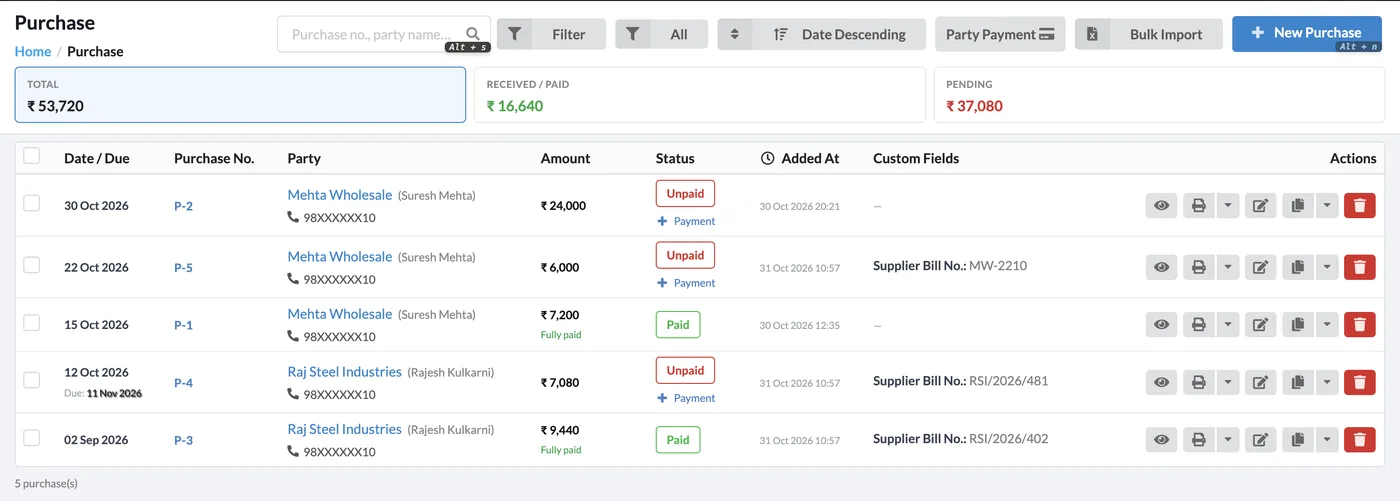
The purchase list shows the total purchased, the amount paid and what is still pending, with the supplier bill number in its own column and a Payment link on every unpaid bill.
- Filter by date, party and status
- Bulk import purchase bills
- Supplier mobile and contact name on each row
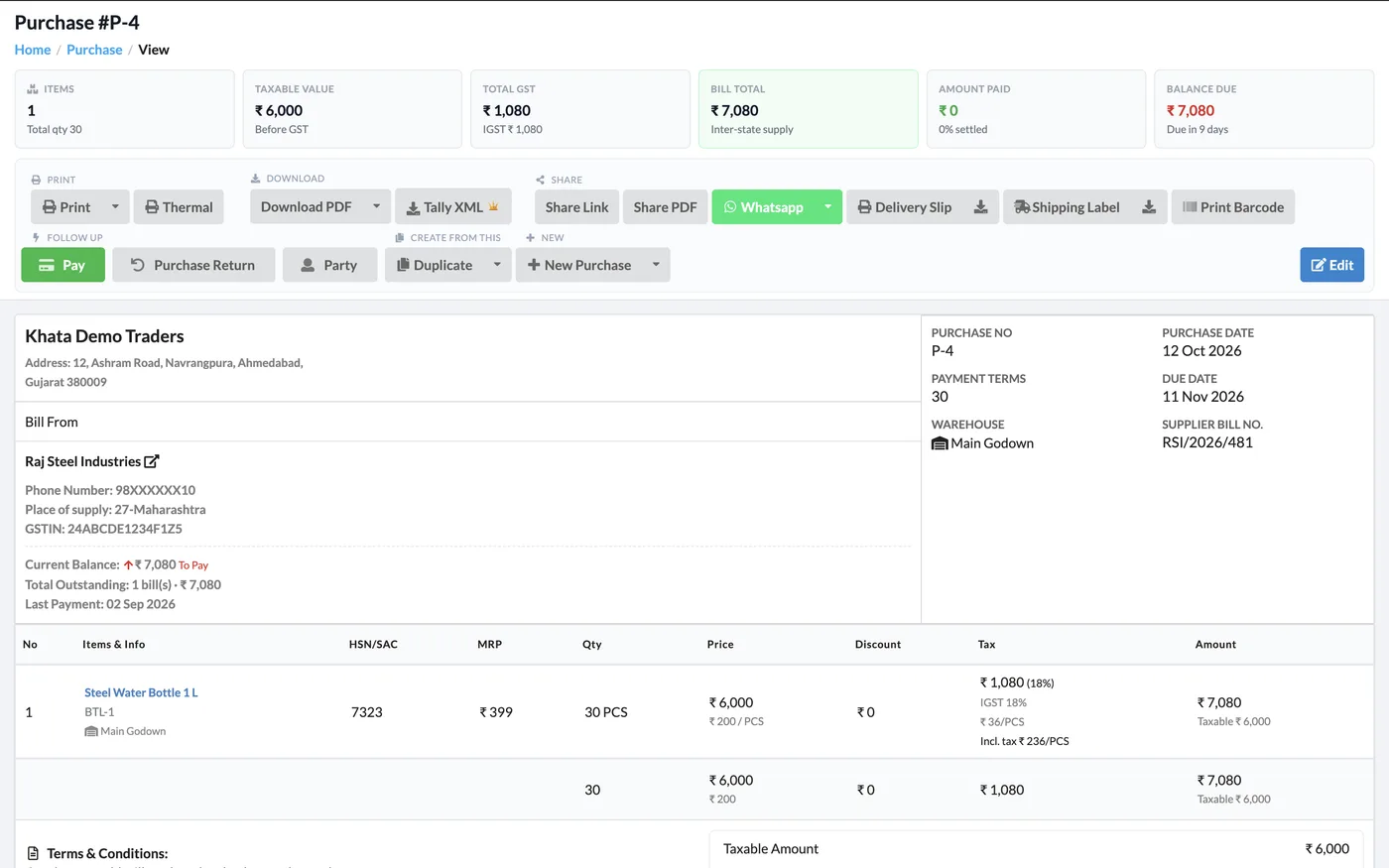
A Complete Purchase View
Each purchase shows taxable value, GST, bill total, amount paid and balance due, the supplier’s current balance and the warehouse the goods went into — with Pay, Purchase Return and Duplicate buttons on top.
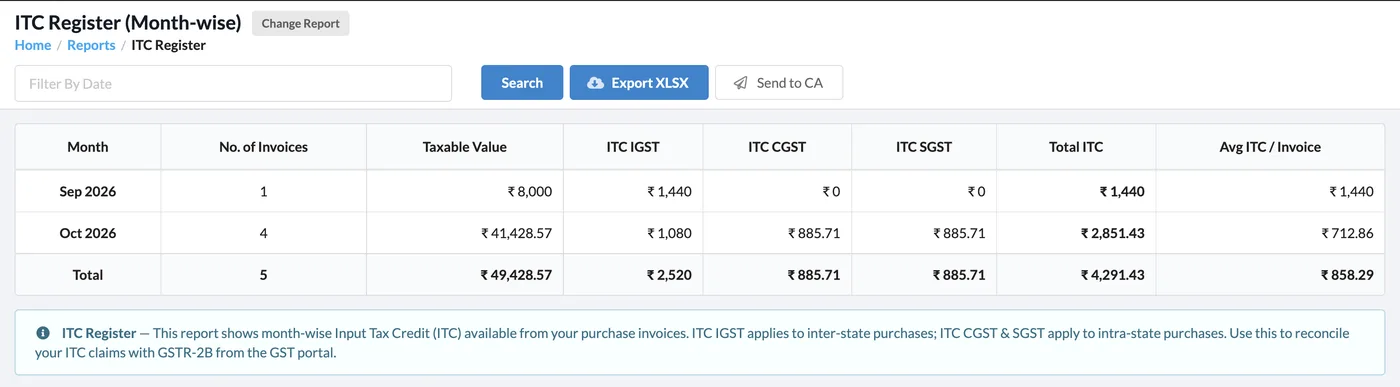
ITC Register
Month-wise input tax credit from all your GST-registered purchases — IGST, CGST and SGST — with export to Excel and a Send to CA button.
How It Works
Add a purchase
Go to Purchase → New Purchase, pick the supplier and enter their bill number and date.
Add items
Add items with purchase price and GST. Choose the warehouse the stock goes into.
Pay the supplier
Record a full or part payment now, or later from the purchase list or the supplier’s page.
Check your ITC
Open Reports → ITC Register or GSTR-2B Reconciliation before you file.
Who It Is For
Good to Know
- Stock increases when you save a purchase and decreases on a purchase return.
- The supplier bill number is stored separately from your own purchase number.
- Only purchases from GST-registered suppliers count towards the ITC Register.
- Repeat purchases can be set up as recurring purchases.
Frequently Asked Questions
Can I enter the supplier’s own bill number?
Yes. Every purchase has a Supplier Bill No. field, shown on the purchase list and the purchase view, separate from your own purchase number.
Does a purchase update my stock?
Yes. Stock goes up as soon as you save the purchase, into the warehouse you choose if you use warehouses.
How do I return goods to a supplier?
Open the purchase and click Purchase Return. Stock and the supplier’s balance are adjusted, with GST.
Can I see how much input tax credit I have?
Yes. The ITC Register shows month-wise IGST, CGST and SGST credit, and GSTR-2B Reconciliation matches your purchases with the supplier-reported data.
Related Features
Track Purchases & ITC — Free
No credit card needed. Create your account and start in minutes.



Start Using Khata Billing — 100% Free
GST Billing · Inventory · POS · Payroll · Banking · GST Reports — all in one free app