Recurring Invoices
Set It Once.
Bill Every Month.
Some bills repeat — rent, maintenance contracts, retainers, weekly supplies. Create a recurring profile once and Khata Billing makes the bill on its own day, numbered, taxed and with stock updated exactly like one you save yourself. Choose to create it automatically or keep it for your review first.
What You Can Do
- Repeat bills weekly, monthly, quarterly or yearly
- Pick the day — e.g. every Friday or the 1st of the month
- Set a start date and an optional end date
- Create the bill automatically or hold it for review
- Use it for sale invoices and for purchases
- Pause and resume a profile at any time
- See active, due now, needs attention and paused profiles
- Open every bill a profile has created
Any Frequency
Weekly to yearly
Auto or Review
You decide per profile
Pause & Resume
Stop without deleting
Numbered & Taxed
Just like a normal bill
See It in the App
Real screens from Khata Billing — sample data shown.
All Your Repeat Bills in One Place
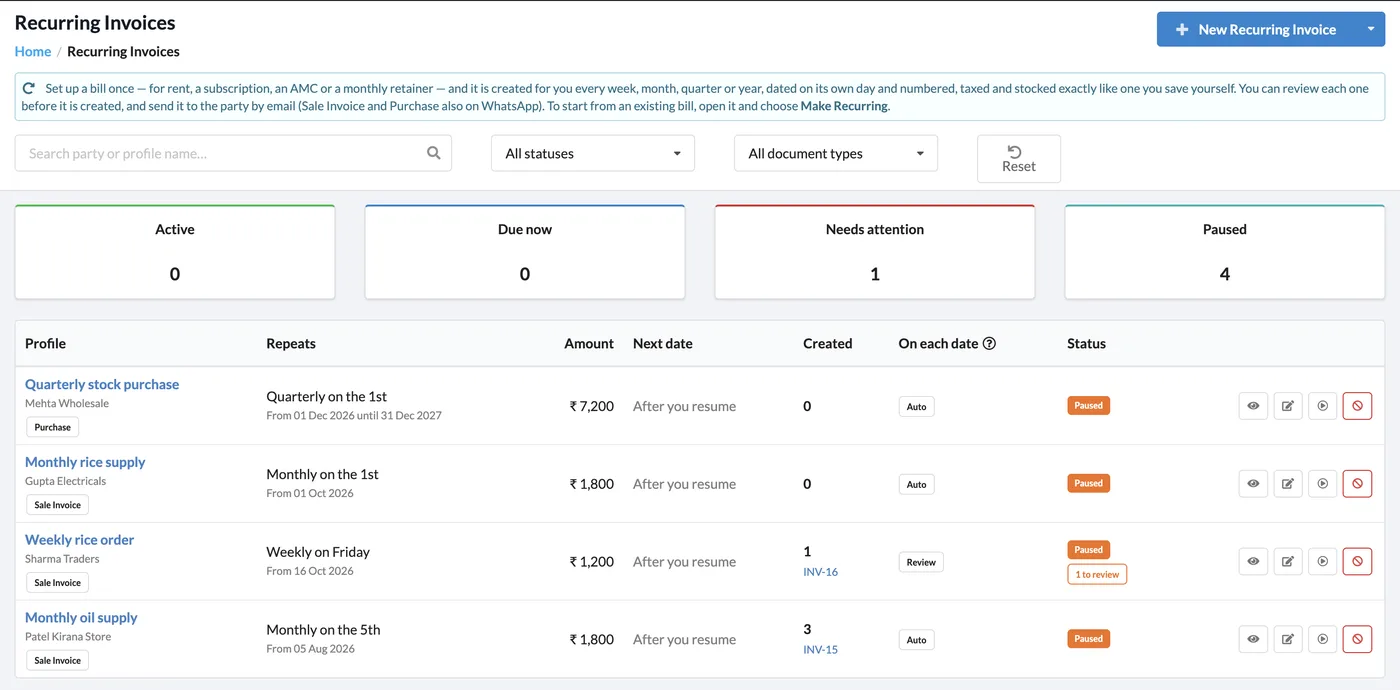
The Recurring Invoices page lists every profile with its party, document type, schedule, amount, next date, how many bills it has created and its status.
- Filter by status and document type
- Counters for active, due now, needs attention and paused
- Review badge when a created bill is waiting for you
How It Works
Open Recurring Invoices
Go to Sales → Recurring Invoices and click New Recurring Invoice.
Fill the bill once
Choose the party, items, taxes and the document type — sale invoice or purchase.
Set the schedule
Pick weekly, monthly, quarterly or yearly, the day, the start date and an optional end date.
Choose Auto or Review
Auto creates the bill on its date; Review keeps it for you to check first. Pause or resume any time.
Who It Is For
Good to Know
- Each created bill is a normal invoice: it gets the next invoice number, GST and stock movement like a bill you save yourself.
- Pausing a profile stops new bills until you resume it; nothing is deleted.
Frequently Asked Questions
Which documents can repeat?
Sale invoices and purchases can be set to repeat, so you can automate both regular sales and regular purchase entries.
Can I check a bill before it is created?
Yes. Set the profile to Review and the bill waits for you to check it; set it to Auto to create it on its date without asking.
Can I stop a recurring invoice for a while?
Yes. Pause the profile and resume it whenever you like. You can also set an end date when creating it.
Will recurring bills update my stock?
Yes. Each created bill is numbered, taxed and stocked exactly like one you save yourself.
Related Features
Automate Your Repeat Bills — Free
No credit card needed. Create your account and start in minutes.



Start Using Khata Billing — 100% Free
GST Billing · Inventory · POS · Payroll · Banking · GST Reports — all in one free app