Backup & Restore
One Click Today.
Peace of Mind Tomorrow.
A backup is a full copy of your business data: bills, payments, expenses, parties, items, stock, bank accounts and settings. Create one before a big change, keep the latest five on the server, and restore whenever you need to — with a safety copy made automatically just before every restore.
What You Can Do
- Back up all business data in one click
- Your latest 5 backups kept on the server
- Automatic safety copy just before every restore
- Small backups (10 MB or less) also emailed to you
- Restore from a backup when something goes wrong
- See your restore history
Full Copy
Bills, stock, parties, settings
Last 5 Kept
On the server
Safety Copy
Before every restore
Emailed
Backups up to 10 MB
See It in the App
Real screens from Khata Billing — sample data shown.
Backups and Restore History in One Place
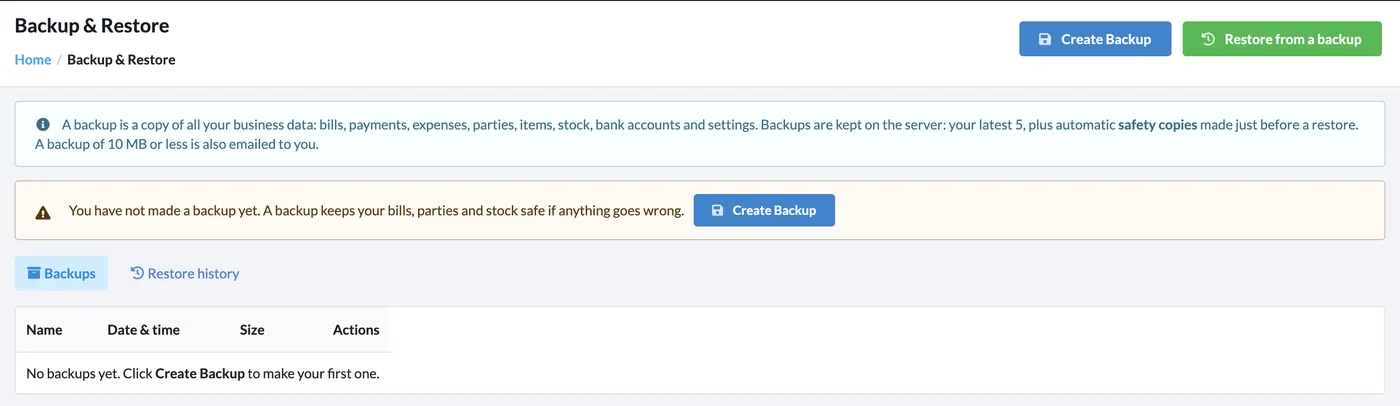
Create Backup and Restore from a backup sit side by side, with your backups listed by name, date and size and a separate restore history tab.
How It Works
Open Backup & Restore
Go to Settings → Backup & Restore.
Create a backup
Click Create Backup. It appears in the Backups list with date and size.
Restore if needed
Click Restore from a backup and choose one. A safety copy of your current data is made first.
Check history
Open Restore history to see when data was restored.
Who It Is For
Good to Know
- A restore replaces your current data with the backup — a safety copy of the current data is made first.
- Older backups beyond the latest five are removed automatically.
- To start completely fresh instead, use Clear All Data in Account Settings.
Frequently Asked Questions
What is included in a backup?
Bills, payments, expenses, parties, items, stock, bank accounts and settings — all your business data.
How many backups are kept?
Your latest 5 backups, plus the automatic safety copies made just before a restore.
What happens to my current data when I restore?
A safety copy is made automatically before the restore, so you can go back if you picked the wrong backup.
Will I get the backup by email?
Backups of 10 MB or less are also emailed to you.
Related Features
Keep Your Business Data Safe — Free
No credit card needed. Create your account and start in minutes.



Start Using Khata Billing — 100% Free
GST Billing · Inventory · POS · Payroll · Banking · GST Reports — all in one free app