E-Way Bill, TDS, RCM & SEZ
Advanced GST —
Only When You Need It
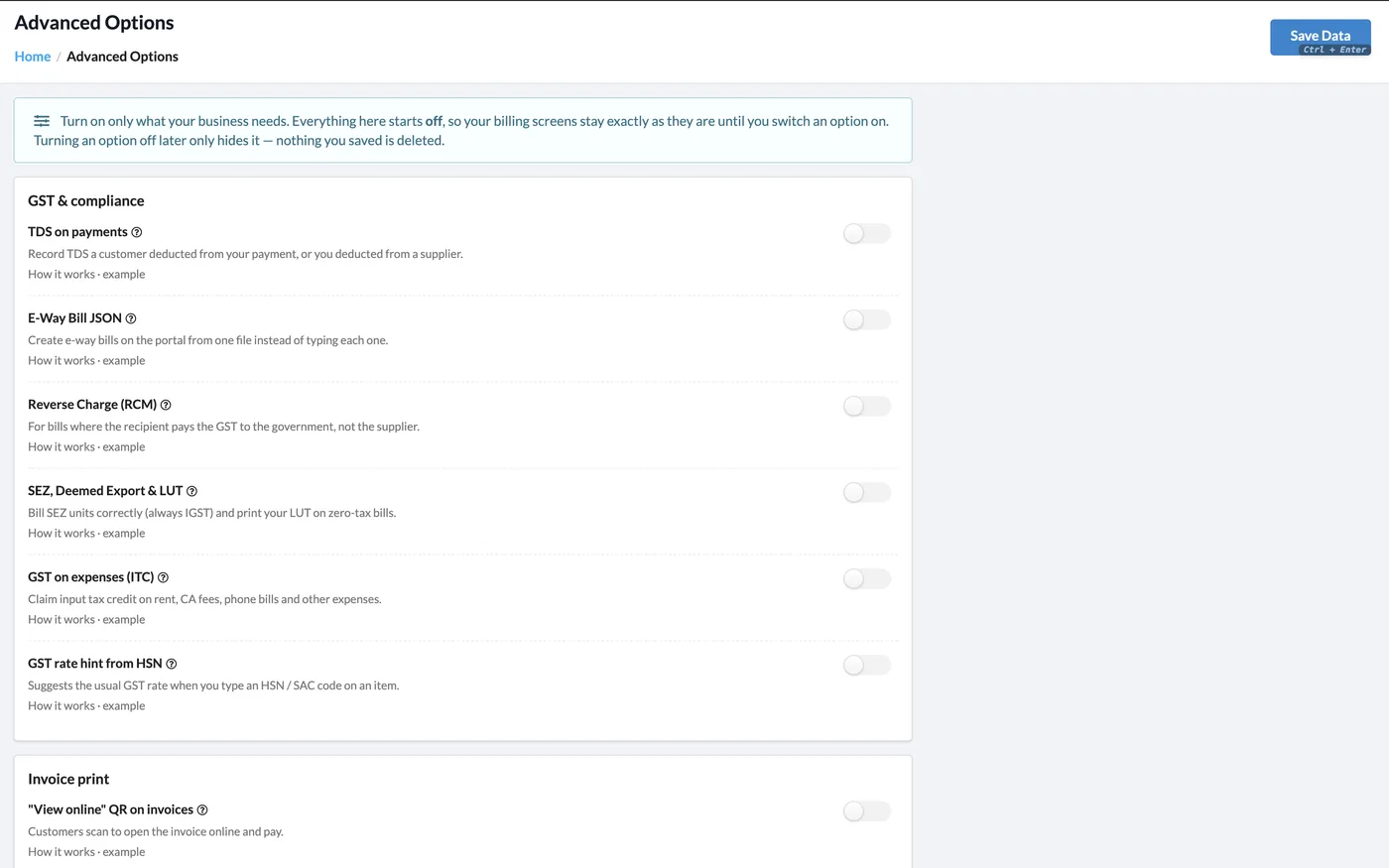
Most businesses never need reverse charge or SEZ billing — some need them every day. In Khata Billing these options live in Settings → Advanced Options and all start off, so your billing screens stay simple until you switch one on. Turning an option off later only hides it; nothing you saved is deleted.
What You Can Do
- E-Way Bill JSON: create many e-way bills on the portal from one file
- TDS on payments: record TDS deducted by a customer or by you
- Reverse Charge (RCM) bills where the recipient pays the GST
- SEZ, deemed export and LUT — always IGST, LUT printed on zero-tax bills
- GST on expenses to claim ITC on rent, CA fees, phone bills and more
- GST rate hint from the HSN / SAC code on items
- “View online” QR on invoices for customers to open and pay
- Google Review QR on invoices
E-Way Bill JSON
Bulk upload to the portal
TDS
On payments in and out
Reverse Charge
RCM-ready bills
SEZ & LUT
Zero-rated supplies
See It in the App
Real screens from Khata Billing — sample data shown.
Switch On Only What You Need
Each option has a short explanation and a worked example. Everything starts off, so nothing changes on your bills until you decide.
- GST & compliance options in one place
- Invoice print extras: View-online QR and Google Review QR
- Turning an option off later hides it without deleting data
Then File with Confidence
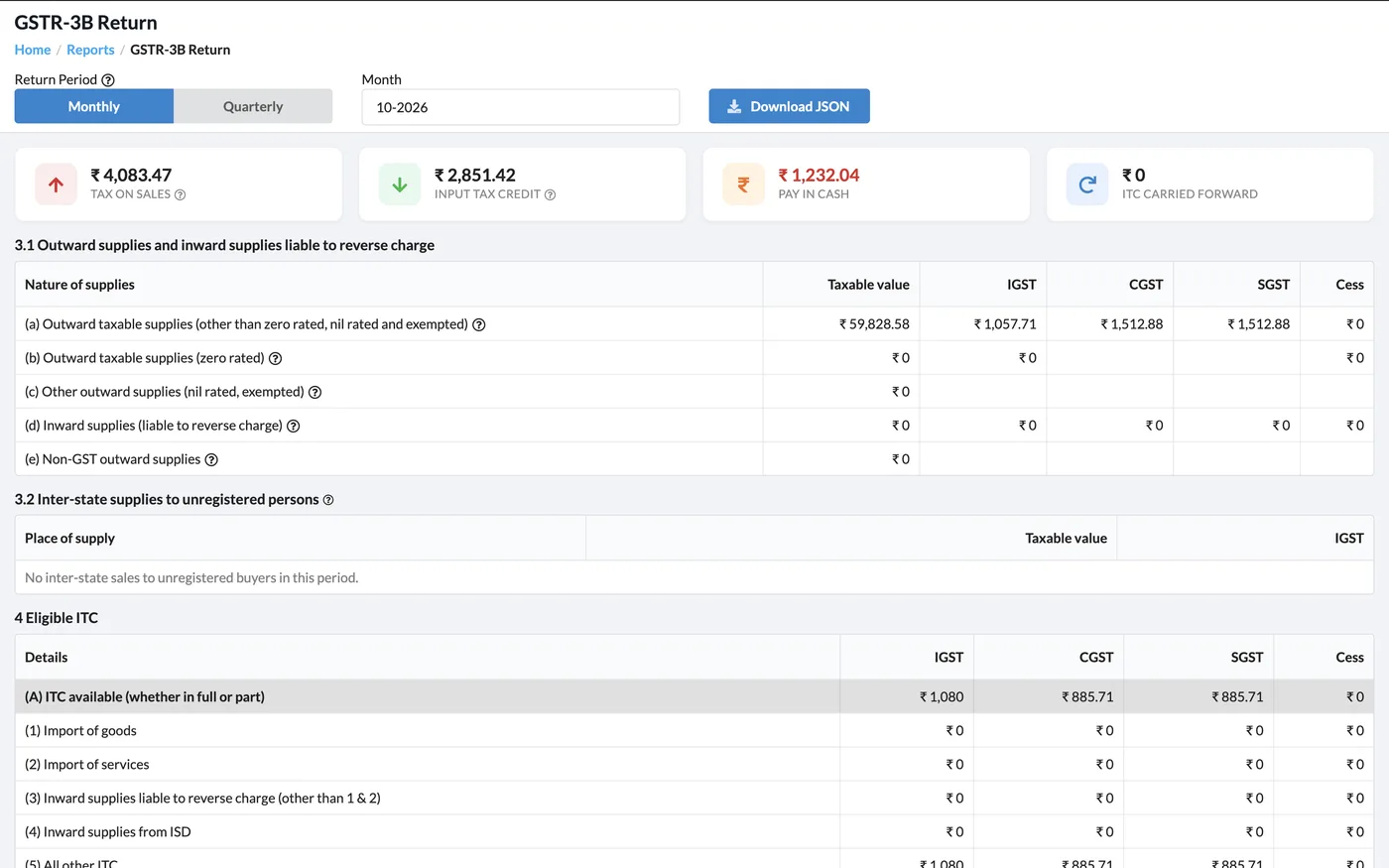
Your GST reports, including the GSTR-3B return and ITC register, are built from the same bills and expenses.
How It Works
Open Advanced Options
Go to Settings → Advanced Options.
Read the example
Click How it works · example next to an option to see when you need it.
Switch it on
Turn on the options you need and click Save Data.
Bill as usual
The new fields appear on invoices, payments or expenses where they apply.
Who It Is For
Good to Know
- All advanced options start off; your screens do not change until you switch one on.
- Turning an option off later only hides it — nothing saved is deleted.
- E-way bill JSON is uploaded on the government e-way bill portal to generate the e-way bills.
- App Lock (PIN, fingerprint or face) is set on each phone in the mobile app, not here.
Frequently Asked Questions
How do I create e-way bills from Khata Billing?
Turn on E-Way Bill JSON in Settings → Advanced Options. Then download one JSON file for your invoices and upload it on the e-way bill portal instead of typing each one.
Can I record TDS deducted by my customer?
Yes. Turn on TDS on payments, and the payment form lets you enter TDS deducted by a customer or by you on a supplier payment.
Does Khata Billing support reverse charge invoices?
Yes. Turn on Reverse Charge (RCM) for bills where the recipient pays GST to the government instead of the supplier.
Can I bill an SEZ unit?
Yes. With SEZ, Deemed Export & LUT turned on, SEZ bills always use IGST and your LUT is printed on zero-tax bills.
Related Features
Bill GST the Right Way — Free
No credit card needed. Create your account and start in minutes.



Start Using Khata Billing — 100% Free
GST Billing · Inventory · POS · Payroll · Banking · GST Reports — all in one free app