Thermal Receipt Printing
Receipts That Look Right
on Any Thermal Printer
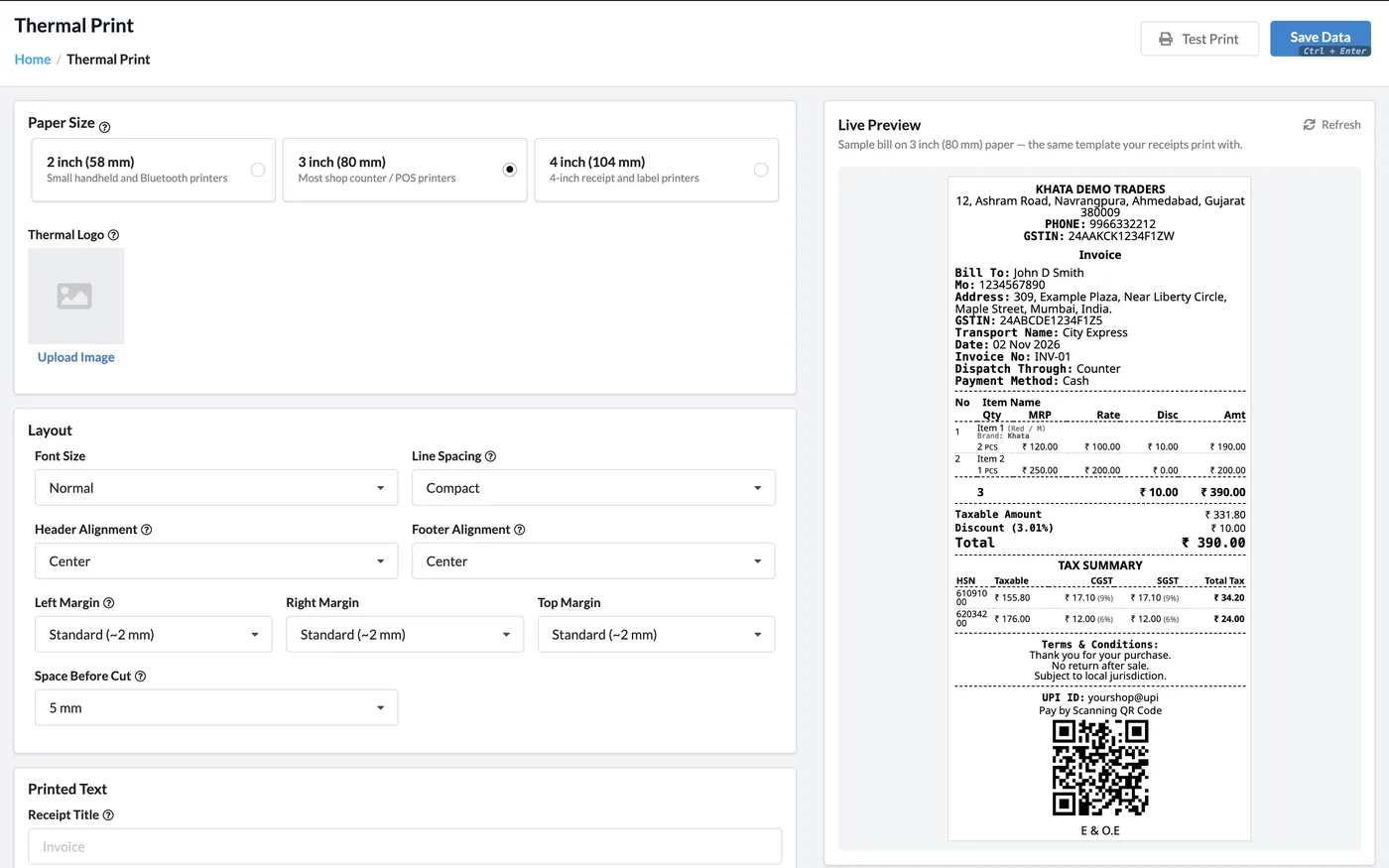
Khata Billing prints receipts on 2-inch (58 mm), 3-inch (80 mm) and 4-inch (104 mm) thermal printers. Pick the paper size, add your logo, set font size, spacing and margins, choose exactly which details print — and watch the live preview change as you go.
What You Can Do
- 2" (58 mm), 3" (80 mm) and 4" (104 mm) paper
- Thermal logo, header and footer messages
- Font size, line spacing, alignment and margins
- Space before cut for auto-cutter printers
- Choose business, customer and bill details to print
- Item columns: serial no., description, MRP, rate, discount, tax
- GST summary table, received & balance due, UPI ID and QR
- Terms & conditions and E & O.E on the footer
3 Paper Sizes
58, 80 and 104 mm
Live Preview
See changes instantly
GST Summary
HSN-wise tax table
UPI QR
Get paid at the counter
See It in the App
Real screens from Khata Billing — sample data shown.
Set It Up with a Live Preview
Every option on the left updates the sample receipt on the right — sized to your paper — so you know exactly how the bill will print before you print it.
- Test Print button to check your printer
- Logo and image support on thermal receipts
- Settings saved once, used for every thermal print
How It Works
Open Thermal Print
Go to Settings → Thermal Print.
Pick paper size
Choose 2 inch (58 mm), 3 inch (80 mm) or 4 inch (104 mm).
Choose what prints
Upload a logo, set layout and switch business, customer, item and total details on or off.
Test and save
Click Test Print, adjust if needed, and Save. Use the Thermal button on any invoice or POS bill.
Who It Is For
Good to Know
- Printing goes through your browser and the printer’s driver; switch on auto-cut in the driver settings once.
- The bill number and date always print — a GST invoice must show them.
- Each receipt prints as one continuous page, so it is not split across sheets.
- Use the Test Print button after changing paper size or margins.
Frequently Asked Questions
Which thermal printers work with Khata Billing?
Any 2-inch (58 mm), 3-inch (80 mm) or 4-inch (104 mm) thermal printer that your computer, phone or browser can print to, including USB and Bluetooth models.
Can I print my logo on thermal receipts?
Yes. Upload a thermal logo in Settings → Thermal Print and switch on Thermal Logo under Business Details.
Does the thermal bill show GST?
Yes. Item tax lines and an HSN-wise GST summary table can be printed, along with the GSTIN of your business and your customer.
Why doesn’t my printer cut the paper?
The cut is made by the printer driver. Turn on auto-cut in the driver settings once, and set Space Before Cut in Khata Billing.
Related Features
Print Your First Receipt — Free
No credit card needed. Create your account and start in minutes.



Start Using Khata Billing — 100% Free
GST Billing · Inventory · POS · Payroll · Banking · GST Reports — all in one free app